This guide to google business profile suspended explains causes and fixes.
If your Google Business Profile is suspended, don’t panic, and don’t create a new profile. Start by finding the stated reason, correcting the issue and preparing evidence that your Irish business is genuine and eligible.
Here’s the process:
- Find the reason. Open Google’s appeals tool. It identifies the restricted profile, explains the moderation action and links to the relevant policy.
- Fix the underlying issue. Check your business name, address, eligibility, categories and duplicate listings against Google’s guidelines.
- Gather evidence. Business registration, licences, tax documents and utility bills can help demonstrate that your business operates as represented.
- Submit one appeal. Follow the current upload instructions in the appeals tool. Google’s published guidance still says evidence submitted through its linked form must be uploaded within 60 minutes of submitting the appeal.
- Wait for the decision. Google says appeal reviews can take up to five business days. Avoid submitting duplicate appeals for the same issue while waiting.
Most suspensions involve a relatively small set of eligibility or profile-compliance problems. Some can be corrected, but reinstatement is never guaranteed: Google makes the final decision.
At KJK SEO, we help Irish businesses diagnose and fix Google Business Profile problems — including suspensions. This guide walks through the same process we follow: find the stated reason, fix the issue, and prepare your evidence before appealing.
This guide explains Google’s published process and practical steps for Irish businesses. It cannot guarantee reinstatement.
What does a Google Business Profile suspension mean?
Google may suspend or disable a Business Profile that does not comply with its guidelines.
Owners may notice:
- A suspension or restriction notice in their Business Profile dashboard.
- The listing disappearing from Google Search or Maps.
- Losing the ability to manage or edit the profile.
- A sudden reduction in calls, website visits or direction requests.
Not every profile problem is a suspension. A rejected business-name edit, removed photo or restricted post may be a separate content moderation decision. The correct appeal route depends on the type of restriction.
Account-level restrictions are a separate issue. Google says a restricted Google Account or Business Profile must be reinstated before you can appeal certain content decisions.
The most common causes of Google Business Profile suspension
| Cause | What it looks like | Why it can cause a problem |
|---|---|---|
| Keywords in the business name | “Kelly Plumbing – Emergency Plumber Dublin” | Google expects the real-world business name, not added services or locations. |
| Virtual office or co-working address | A listing at a serviced office where the business is not actually staffed | Service-area businesses cannot use virtual offices as their operating location. |
| Home address shown when customers do not visit | A tradesperson’s residential address visible on Maps | Service-area businesses should hide their address when customers are not served there. |
| No permanent signage at a storefront | A supposed shopfront without permanent signage | A business must meet Google’s eligibility requirements for a customer-facing location. |
| Duplicate profiles | Two listings for one business, or one listing for every town served | Google generally allows one profile per business, with separate profiles for eligible staffed locations. |
| Service areas that are too large | A business based in Athlone listing all of Ireland | Google says service areas should generally remain within about two hours’ driving time from the business base. |
| Ineligible business type | An online-only business with no in-person customer contact | Business Profiles are intended for eligible businesses that meet customers in person. |
| Several major edits at once | Name, address, category and phone number changed together | Major changes can prompt additional verification or review. This is an industry-observed risk, not a published automatic suspension rule. |
Whitespark’s 2026 Local Search Ranking Factors survey includes expert opinions on factors associated with negative local-search outcomes and suspension risk. These include keyword-stuffed names, service-area businesses displaying their addresses, unusually large service areas and website links that redirect to another domain. The survey reflects practitioner opinions; it is not Google’s ranking formula or a definitive explanation for an individual suspension.
What to do in the first 48 hours
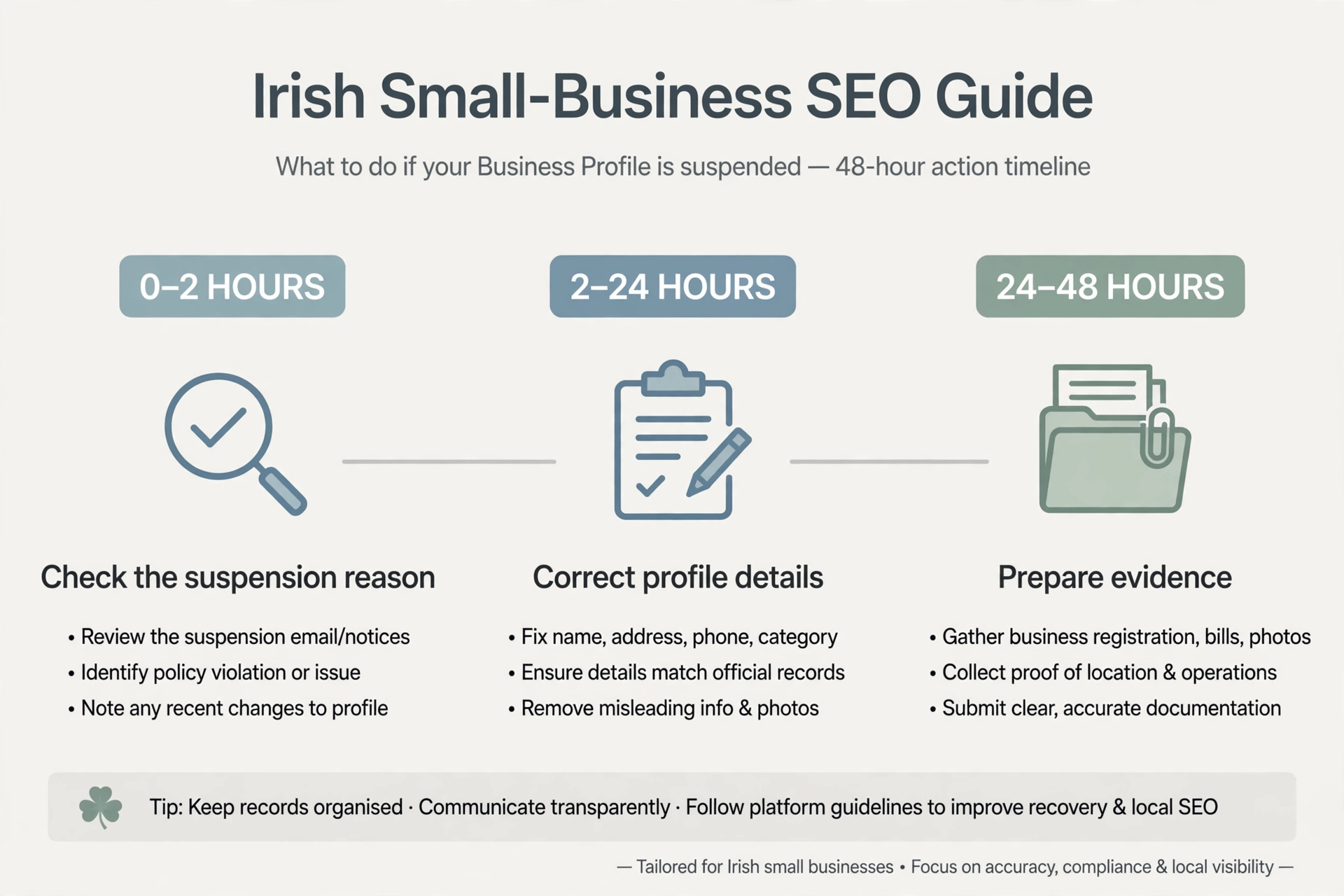
Hours 0–2: Stop and check
The first priority is to avoid making the situation harder to diagnose.
- Do not create a new profile. Google explicitly advises against creating another profile for the same business while an appeal is under review.
- Stop making repeated edits. Avoid changing several fields in the hope that one will restore visibility.
- Open the Google Business Profile appeals tool. Sign in using the Google Account associated with the profile.
- Read the stated reason. The tool identifies the restricted profile, the moderation action and the policy involved.
- Save screenshots. Keep copies of the notice, stated reason, policy link and any relevant account messages.
Start with Google’s official guide: Fix a suspended or disabled Business Profile.
Hours 2–24: Fix the likely cause
Compare your listing with Google’s guidelines for representing your business.
Check each of these areas:
- Business name: Does it match the name customers recognise and the name used on real-world business materials?
- Address: If customers do not visit your premises, is the address hidden and the service area configured correctly?
- Signage: If you claim to have a customer-facing premises, is permanent signage present?
- Duplicates: Search Google Maps using your business name, phone number and address. Check for duplicate listings.
- Category: Is the primary category accurate and specific to the actual business?
- Website: Does the profile link directly to your own business website rather than a redirect or another domain?
- Service areas: Are the areas realistic for the business’s operating base?
Correct any non-compliant details before appealing. Google advises businesses to ensure their profiles follow its guidelines before submitting a reinstatement request.
Hours 24–48: Prepare your evidence
Evidence should support two things: that the business is genuine and that it is eligible to operate as represented on the profile.
Google lists examples such as:
- Official business registration.
- A business licence.
- Tax certificates.
- Utility bills for the business, including electricity, phone, water or internet.
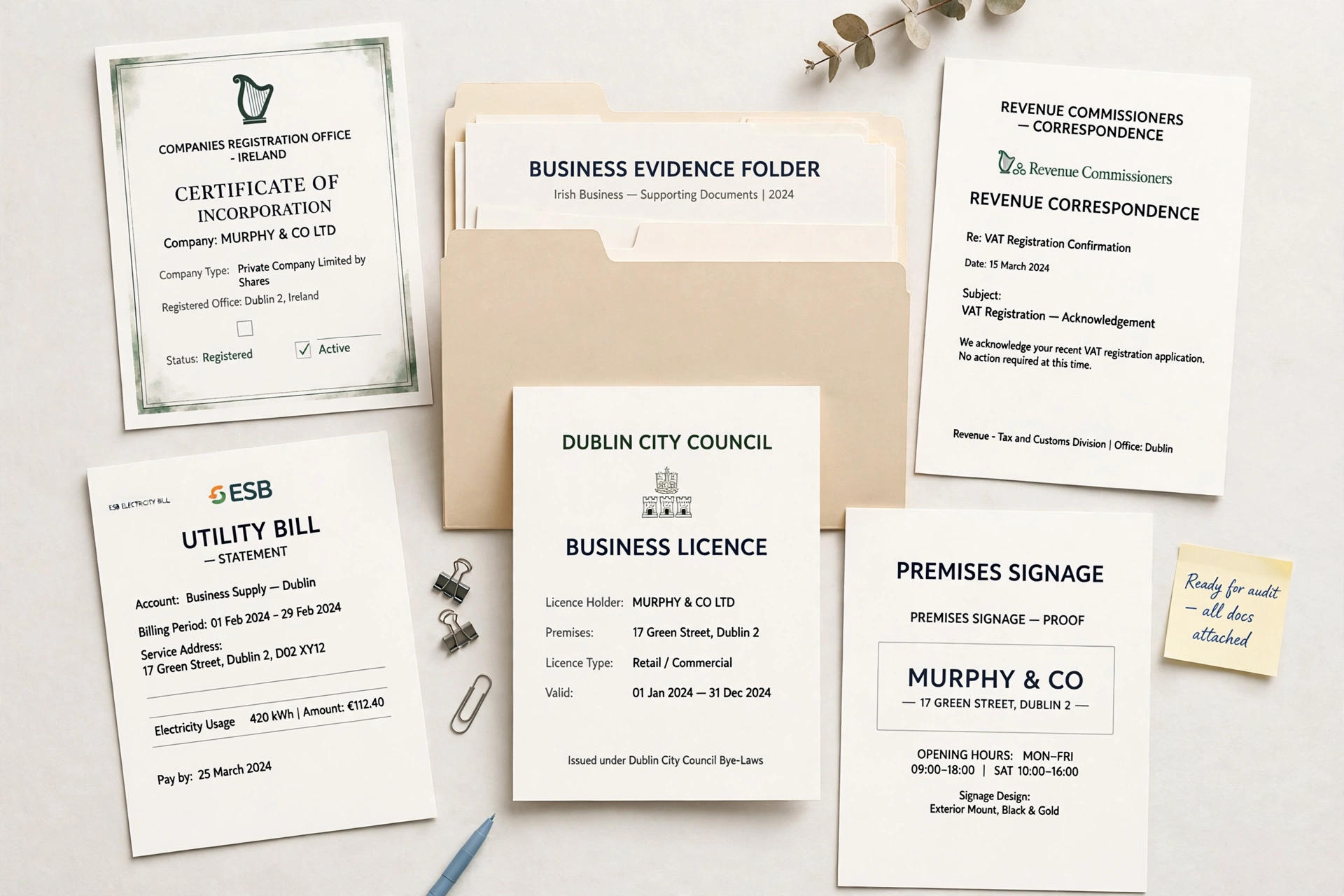
Irish documents that may support an appeal
| Google’s evidence category | Irish examples |
|---|---|
| Business registration | Companies Registration Office certificate of incorporation for a company; CRO business-name registration where applicable |
| Business licence | Relevant sector licence or registration, such as a Private Security Authority licence, RGI registration or Safe Electric registration |
| Tax documents | Revenue correspondence confirming tax registration or VAT details |
| Utility bills | Recent electricity, phone or broadband bill in the business name, showing the relevant address |
| Other supporting documents | Commercial lease, business insurance certificate or photographs of permanent signage |
These are examples that may fit Google’s evidence categories, not a guarantee that Google will accept every document in every case.
Check consistency carefully. Google advises that the business name and address on submitted documents should match the profile being appealed.
If you work from home, your residential address may be hidden from customers while still being the address used for verification. A relevant utility bill or Revenue document at that address may help support the case, provided it genuinely relates to the business and matches the details under review.
How to submit a Google Business Profile reinstatement appeal
For an Irish business, use Google’s official appeals tool and follow the route shown for the affected profile.
- Open the Google Business Profile appeals tool.
- Sign in to the Google Account associated with the profile.
- Select the Business Profile you want to reinstate.
- Review the moderation reason and linked policy.
- Select the decision you want to appeal.
- Submit the appeal and follow the evidence instructions shown on screen.
Important: Check the evidence-upload step
Google’s published help currently says that, after submitting an appeal, you may be prompted to open a linked evidence form. It states that supporting evidence must be submitted within 60 minutes of submitting the appeal or it will not be attached.
Industry reporting in July 2026 described a revised workflow in which evidence could be attached directly within the appeal form. The interface may therefore vary. Prepare your documents in advance and follow the instructions actually displayed in your account. Do not assume that an upload deadline or step has disappeared unless the live tool confirms it.
What to write in your appeal
Keep any explanation short, factual and specific.
Include:
- What the business does.
- Where it operates.
- Whether customers visit the premises or are served at their own locations.
- What you corrected, if anything.
- Which documents support the business details.
For example:
“We removed ‘Emergency Plumber Dublin’ from the business name so it matches our real-world trading name and business records. We operate as a service-area business and have hidden the residential address from customers. The attached documents support the business name and operating address.”
Only use wording that accurately describes your business and the changes you have actually made.
Avoid emotional arguments, accusations or unsupported claims. The purpose is to demonstrate compliance and eligibility.
How long does an appeal take?
Google says appeal reviews and decisions can take up to five business days.
While waiting:
- Do not submit multiple appeals for the same issue before receiving a decision.
- Check the appeal status in the appeals tool.
- Keep the confirmation email and copies of the submitted evidence.
- Avoid further profile changes unless Google requests them or a clear compliance issue needs correction.
What if your appeal is rejected?
A rejected appeal does not automatically mean there is no further route, but repeating the same submission without addressing the issue is unlikely to help.
Start by reading the decision carefully.
Then:
- Recheck the business name, address type, eligibility and duplicate listings.
- Identify any evidence gap. Does the documentation actually support the profile’s business name and address?
- Gather additional relevant documents that were not included previously.
- Check whether Google offers an additional review option for the denied request.
- For complex cases, such as multiple locations or account-level restrictions, consider specialist help.
Google’s current suspended-profile guidance describes an additional review option for certain denied reinstatement requests, where further evidence can be provided. Availability depends on the case.
Irish businesses located in the European Economic Area may also have additional redress options, including out-of-court dispute resolution under applicable EU processes. Check Google’s current help information for eligibility and details.
Be realistic about eligibility. If a business is online-only, uses an address it does not operate from or otherwise fails Google’s eligibility rules, an appeal cannot make that business eligible. The underlying business setup must change, or the company should focus on other marketing channels.
While your profile is suspended: protect your leads
A suspension can interrupt calls and enquiries, but customers may still be able to find your business through other routes.
- Make your website easy to find and call from. Put your phone number and core services where visitors can see them quickly.
- Check Apple Maps and Bing Places. Make sure your business details are accurate on other relevant platforms.
- Tell regular customers how to reach you. Use your normal customer communication channels.
- Consider a short Google Ads campaign. If the lost enquiries justify the cost, advertising on your business name and core service may help bridge the gap. See our guide to Google Ads for Irish tradespeople.
These are temporary lead-protection measures, not substitutes for resolving the suspension.
What to do after reinstatement
Once your profile is restored:
- Check the business name, address, phone number, website, categories and service areas.
- Confirm that reviews and photos are visible.
- Keep your evidence folder in a secure place.
- Make necessary changes carefully, rather than overhauling multiple fields at once.
- Review the profile monthly.
Google and users may suggest changes to business information, so check that the public listing still reflects how your business operates.
How to prevent another Google Business Profile suspension
| Do | Don’t |
|---|---|
| Use your real-world trading name | Add keywords, towns or slogans to the name |
| Hide your address if customers do not visit | Use a virtual office, PO box or someone else’s address as your operating location |
| Keep one profile per eligible business or staffed location | Create a separate profile for every town you serve |
| Keep service areas realistic and within Google’s guidance | List every county in Ireland regardless of where you operate |
| Make necessary changes carefully | Overhaul name, address, category and phone details all at once without a clear reason |
| Link directly to your own website | Use a redirect or unrelated domain |
| Keep registration, lease and bills current and consistent | Rely on expired or mismatched documents |
For a wider profile and local visibility review, see 11 local SEO mistakes Irish businesses make.
When this advice may not apply
Some situations need a different process:
- Account-level restrictions: A restriction affecting your Google Account must be resolved before you can appeal certain profile content decisions.
- Multi-location businesses: Google has a separate process for appeals covering more than 10 Business Profiles, including a spreadsheet with evidence and profile IDs.
- Removed reviews: Review removal decisions use Google’s reviews management tool, not the standard profile suspension appeal route.
- Rejected edits or restricted content: The correct appeal path can differ from a full profile suspension.
If you need help reviewing a suspension, see our local SEO services or contact KJK SEO.
Frequently asked questions
Why was my Google Business Profile suspended?
Common causes include keywords added to the business name, an ineligible or virtual office address, a service-area business displaying its home address, duplicate profiles or service areas that exceed Google’s guidance. The appeals tool shows the moderation reason and links to the relevant policy. Correct the issue before appealing.
How long does a Google Business Profile appeal take?
Google says appeal reviews and decisions can take up to five business days. Do not submit multiple appeals for the same issue while waiting. You can check the status through the Google Business Profile appeals tool.
What evidence should I submit to reinstate my profile?
Google lists official business registration, business licences, tax certificates and business utility bills as examples of useful evidence. Irish examples may include CRO registration, relevant sector licences, Revenue correspondence and electricity or broadband bills. Make sure the name and address match the profile being appealed.
Should I create a new profile if mine is suspended?
No. Google advises against creating a new Business Profile for the same business while an appeal is under review. Correct the underlying issue and use the official appeal process for the existing profile.
Will I lose my Google reviews if my profile is suspended?
A suspension is not a reason to abandon the existing profile and create a duplicate. If the profile is reinstated, check whether its reviews and photos are visible. Google’s handling of a profile and its content depends on the case, so do not assume that a new profile will preserve the existing reviews.
The takeaway
Treat a Google Business Profile suspended notice as a checklist, not a crisis. Find the stated reason, correct the issue, and gather Irish documents that support the business name and address. Submit one calm, factual appeal, following the upload instructions shown in the live tool.
While Google reviews the case, make sure customers can still find your website and contact your business directly.
A google business profile suspended case is fixable with the right steps.