Most Irish businesses that struggle in Google Maps are not necessarily being beaten by competitors with bigger marketing budgets. Sometimes, a handful of avoidable errors are making it harder for customers to find them.
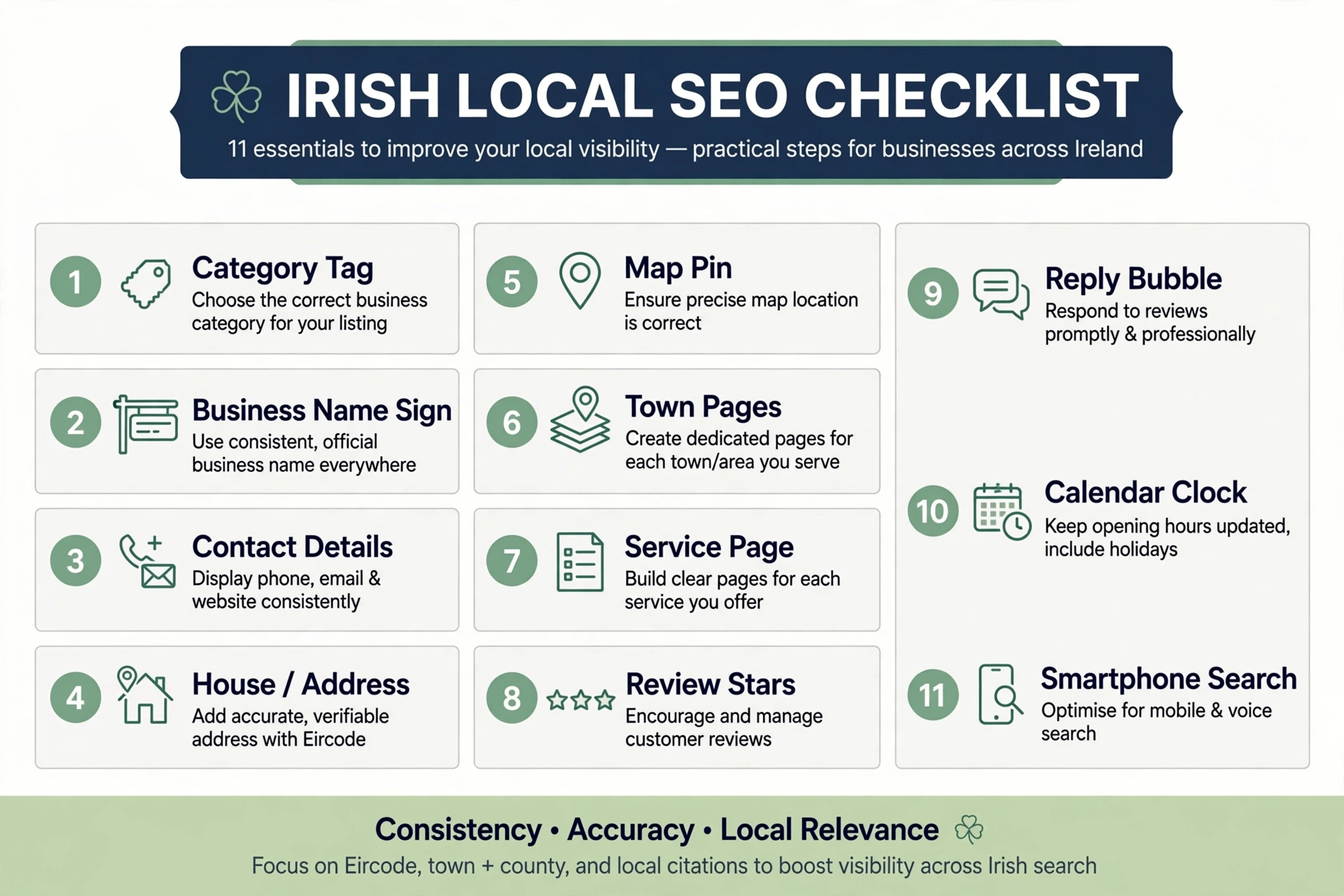
The most common local SEO mistakes include:
- Choosing the wrong primary category
- Stuffing keywords into the business name
- Mismatched name, address and phone details
- Showing a home address or using a virtual office
- Having a map pin in the wrong place
- Publishing copy-paste town pages
- Using one “Services” page for everything
- Having no reliable review process
- Ignoring reviews or oversharing in replies
- Displaying incorrect opening hours, especially on bank holidays
- Judging results from your own phone
Some fixes take minutes. Others need a proper website or citation clean-up. This guide explains how to spot each problem, why it matters and what to do next.
At KJK SEO, we work with Irish businesses on Google Maps visibility every day. This guide is built from the setup problems we keep seeing in real profiles — and how to put them right.
How to Read This Guide
- Google guidance: Requirements and recommendations from Google’s official help pages and policies.
- Industry view: Findings from surveys and practitioner experience. These are not confirmed Google ranking weights.
- Time to fix: A rough estimate for a small business completing the work itself. Verification, approvals and website development can extend the timeline.
Mistake 1: Choosing the Wrong Primary Category
What it looks like: A physiotherapy clinic listed as “Medical Clinic”, a roofer listed as “Construction Company”, or a café using a category that does not accurately describe its main offering.
Why it matters: Your primary category tells Google what your business does. A vague or inaccurate category may make it harder for your profile to match relevant searches.
Whitespark’s 2026 Local Search Ranking Factors survey placed primary Google Business Profile category at the top of its Map Pack factor list. This is an industry survey of expert opinions, not a published Google ranking formula.
Google guidance: Choose the most specific category that accurately describes your overall business. Use only the additional categories needed to describe your core activities. See Google’s help on choosing a business category.
How to Fix It
- Search for your main service and town.
- Review the categories used by relevant local competitors. Tools such as PlePer or GMB Everywhere may help inspect profile information.
- Choose the most specific available category that honestly describes your main business.
- Avoid adding unrelated categories simply to target more keywords.
Watch out: Google may request verification after certain profile edits. Make category changes deliberately rather than repeatedly experimenting.
Estimated time: 15 minutes, excluding any verification.
Mistake 2: Stuffing Keywords Into Your Business Name
What it looks like: “Murphy Electrical – Emergency Electrician Limerick 24/7” when the real-world business name is simply “Murphy Electrical”.
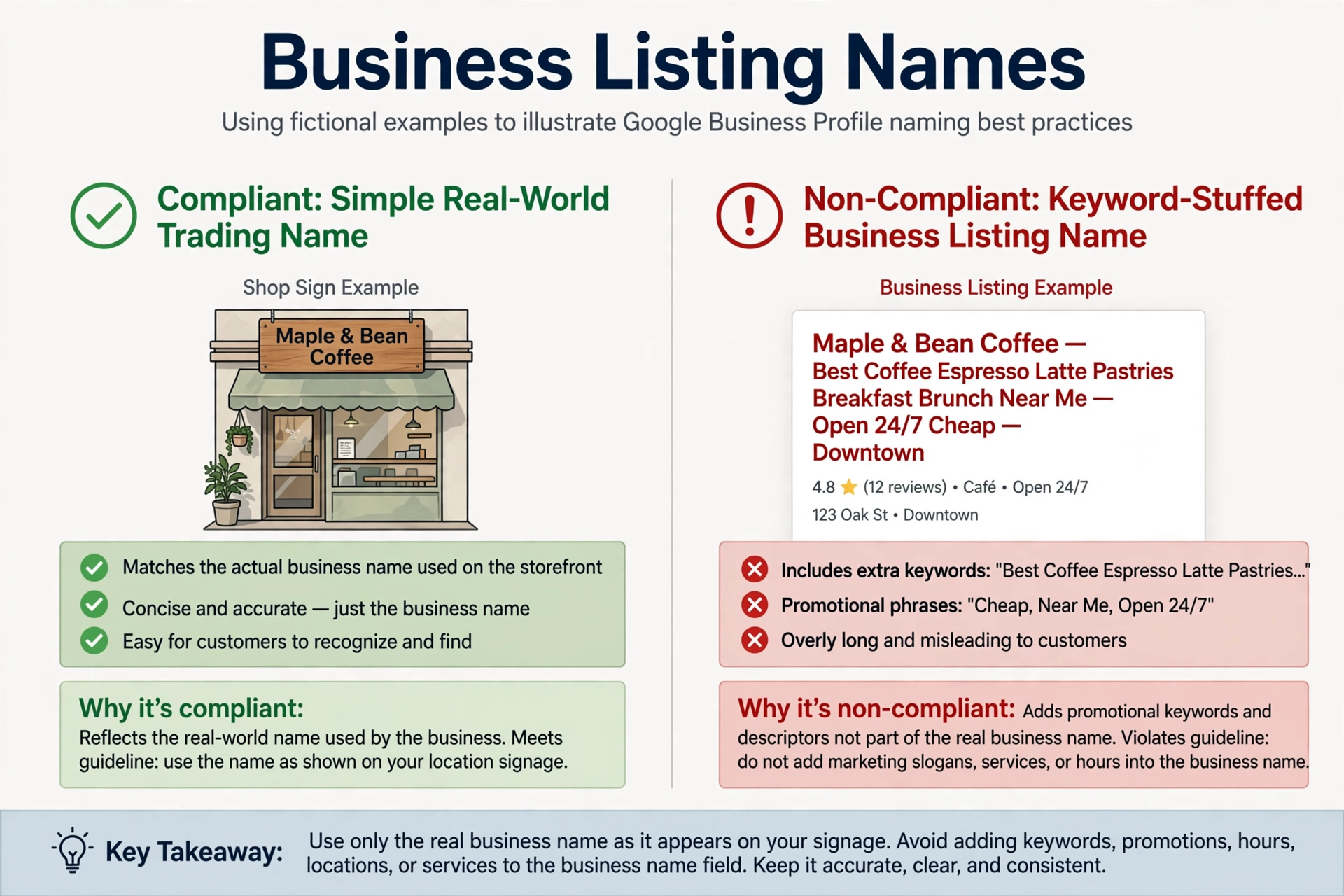
Why it matters: Keyword additions may appear to offer a short-term advantage, but they can breach Google’s Business Profile guidelines and put the listing at risk of suspension.
Google guidance: Your profile name should reflect the name used consistently in the real world, including signage, stationery and branding. Unnecessary information such as service keywords, locations or promotional wording is not permitted. See Google’s guidelines for representing your business.
How to Fix It
Use your genuine trading name on the profile.
If you want to include a keyword in your business name, the legitimate route is a genuine rebrand — not a Google-only edit. The new name should be reflected consistently in your real-world branding and business materials.
If a competitor appears to be using a misleading name, you can suggest an edit or use Google’s Business Redressal Complaint Form where appropriate.
Estimated time: 5 minutes to edit, plus any review or re-verification.
Mistake 3: Mismatched Name, Address and Phone Details
What it looks like:
- “O’Brien Plumbing” on Google and “O’Brien’s Plumbing & Heating Ltd” on GoldenPages.ie.
- “Unit 4, Ballymount” on your website and “4 Ballymount Road, D24” on Facebook.
- An old mobile number on a trade directory while your current number appears elsewhere.
Why it matters: Customers may call a number that no longer works or struggle to confirm which listing belongs to your business. Inconsistent information also makes it harder to maintain accurate listings across platforms.
Whitespark’s 2026 survey includes consistency between a business website and its Google profile, as well as consistency across major platforms, among its local ranking considerations. Treat these as industry observations rather than guaranteed ranking effects.
How to Fix It
- Create a master record of your real business name, address and main phone number.
- Include your Eircode where the relevant platform supports it and it accurately identifies your location.
- Update your website, Google Business Profile, Apple Business Connect, Bing Places and Facebook.
- Search your old phone numbers and addresses in Google to find forgotten listings.
- Work through the main Irish business directories and correct outdated details.
For a directory-by-directory approach, see our guide to Irish business directories for SEO.
Estimated time: 2–4 hours for many small businesses, depending on the number of listings.
Mistake 4: Showing a Home Address or Using a Virtual Office
What it looks like:
- A plumber’s home address appears publicly even though customers never visit.
- A business uses a virtual office or coworking desk in a larger town to appear closer to potential customers.
Why it matters: These setups can breach Google’s location requirements and may lead to profile suspension or removal.
Google guidance: If customers are not served at your business address, hide the address and enter the service areas you genuinely cover. Google allows up to 20 service areas. Its general guidance says the overall area should usually be within about two hours’ driving time of the base, although larger areas may be appropriate for some businesses.
A virtual office is not eligible simply because the business can receive mail there. Google has specific staffing and customer-facing requirements for coworking locations.
How to Fix It
- Use the real operating location for verification.
- Hide the address if customers do not visit it.
- Add only the towns and areas you genuinely serve.
- Avoid creating extra profiles to target additional towns.
Read our guide to service-area businesses on Google Maps.
Estimated time: 10 minutes for a straightforward profile edit, excluding verification or policy review.
Mistake 5: Having a Map Pin in the Wrong Place
What it looks like: Your pin sits on a neighbour’s house, in the middle of a field or at the centre of a townland rather than at the correct premises.
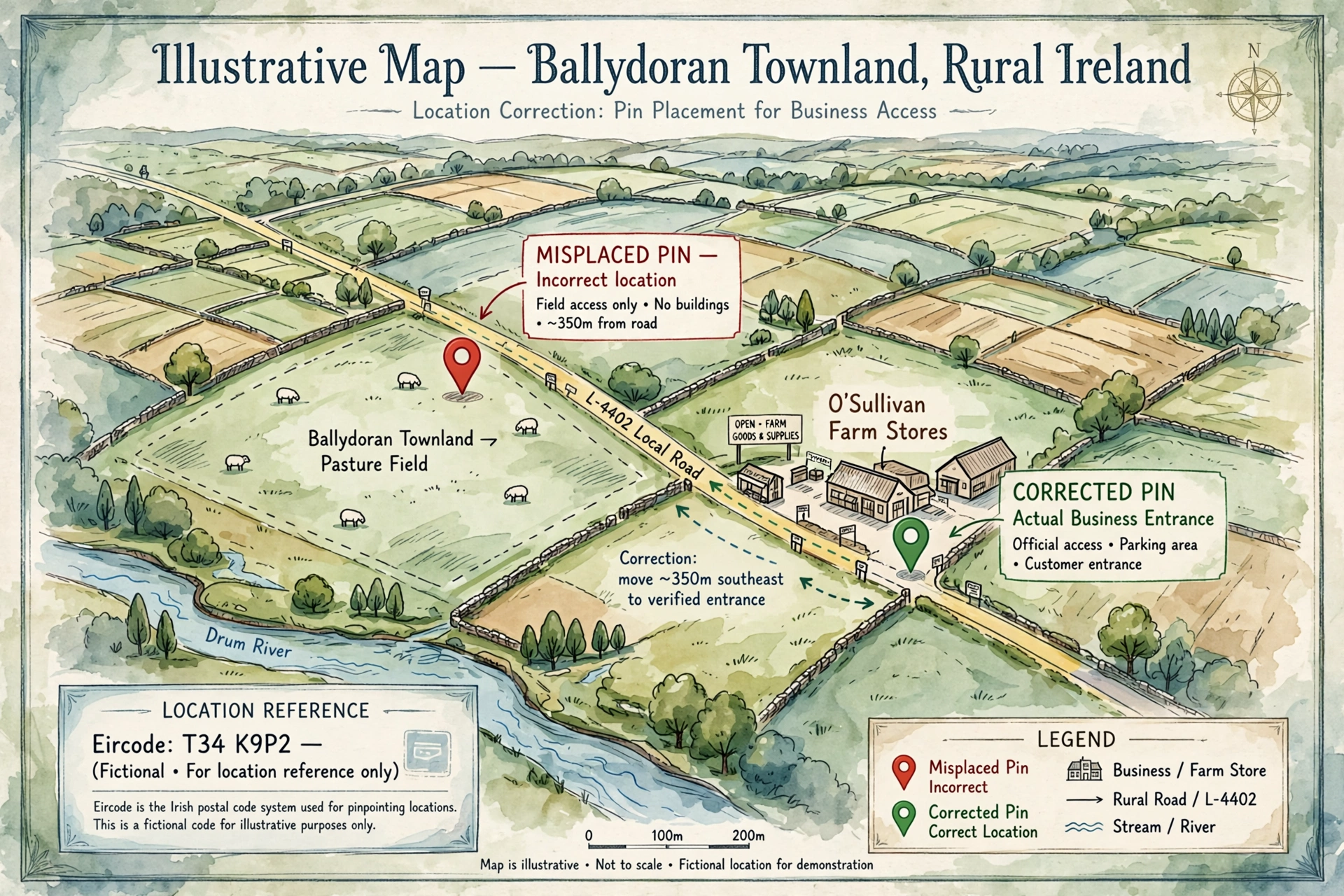
This can be particularly confusing in rural Ireland, where addresses may rely on townland names and Eircodes rather than familiar street numbers.
Why it matters: An inaccurate pin can send customers to the wrong place. Location is also relevant to how Google determines local results, so a misplaced pin can distort your geographic presence.
Whitespark’s 2026 survey includes correct map pin placement among its local ranking factors.
How to Fix It
- Open your Business Profile in Google Maps.
- Zoom in closely on the location.
- Check the pin against the actual building or entrance.
- Correct the location through your profile’s address and map-pin settings.
- Include the correct Eircode where the address form allows it.
If the official address cannot be pinpointed accurately, Google allows businesses to place the marker directly on the map.
Estimated time: 5–15 minutes, plus any review of the edit.
Mistake 6: Publishing Copy-Paste Town Pages
What it looks like: “Electrician in Naas”, “Electrician in Newbridge” and “Electrician in Kildare Town”, each containing identical text with only the town name changed.
Another version is a long block of dozens of town names at the bottom of the homepage.
Why it matters: Near-identical pages provide little extra value to customers and may fall under Google’s doorway abuse or keyword-stuffing policies.
Google guidance: Its spam policies identify multiple pages targeting specific cities or regions that funnel users to one destination, as well as blocks of location names inserted to influence search results. See Google’s spam policies.
How to Fix It
- Review weak or duplicate town pages and merge or remove those that add no distinct value.
- Keep location pages where you can provide genuinely useful local information.
- Include real jobs, service coverage, realistic response times, local details and genuine reviews where available.
- Replace long town-name blocks with a clear “Areas We Cover” page, potentially with a map.
See our guide on how to write location pages that rank.
Estimated time: 1–2 hours to audit and prune a small set of pages. Rebuilding useful pages will take longer.
Mistake 7: Using One “Services” Page for Everything
What it looks like: A single page lists boiler servicing, bathroom installations, leak repairs, heat pumps and underfloor heating, with only one sentence about each.
Why it matters: A page trying to cover every service may not answer the specific questions people have when searching for one service.
Whitespark’s 2026 survey places dedicated service pages among the important local organic search considerations. This is an industry assessment, not a guarantee that creating a page will produce a particular ranking.
How to Fix It
Create a dedicated page for each important service.
A useful service page should explain:
- What the service includes
- Which problems it solves
- How the process works
- Typical pricing or factors affecting price
- Areas covered
- Genuine photos or project examples
- How to request a quote or appointment
Start with the service that matters most to your business rather than creating dozens of thin pages at once.
Estimated time: 2–3 hours per well-planned page, depending on how much original information is available.
Mistake 8: Having a Broken Review Process
What it looks like:
- Never asking customers for reviews and hoping they arrive.
- Asking only customers known to be happy.
- Offering a discount or prize-draw entry in exchange for reviews.
- Asking customers to review the business while they are still on the premises.
Why it matters: A sparse or outdated review profile may give potential customers less information when comparing businesses. Some shortcuts also breach Google’s review policies.
Google guidance: Its policies prohibit incentives for reviews, discouraging negative reviews, selectively soliciting positive reviews, pressuring customers and asking for specific review content. These sit within the Google Maps prohibited and restricted content policy.
The Irish Competition and Consumer Protection Commission (CCPC) also says businesses must take reasonable steps to ensure reviews they display are genuine and must not pay for false or misleading reviews.
How to Fix It
- Create a direct Google review link.
- Send the same neutral request to every customer.
- Ask at an appropriate time after the job or visit.
- Do not offer rewards or ask for a particular rating or wording.
- Make the process easy for staff to follow consistently.
See our guide on how to get more Google reviews.
Estimated time: 30 minutes to set up a simple process.
Mistake 9: Ignoring Reviews or Oversharing in Replies
What it looks like:
- Dozens of reviews have no response.
- Every reply is the same generic “Thanks!”.
- A business argues defensively with an unhappy customer.
- A dentist confirms someone’s treatment or a solicitor mentions a client’s matter.
Why it matters: Future customers can read your replies and form an impression of how you handle concerns. In regulated or sensitive sectors, revealing private information can create serious problems.
Google guidance: Google encourages businesses to reply to reviews. Replies should be professional, helpful and respectful of privacy.
How to Fix It
- Reply to reviews within a few days where practical.
- Mention something specific in positive replies without exposing private details.
- For negative reviews, acknowledge the concern and invite the reviewer to contact a named person or appropriate business channel offline.
- In healthcare, legal and care services, keep replies general. Do not confirm that someone is a patient, client or service user.
Estimated time: About an hour to catch up on a modest backlog, then around 10 minutes per week.
Mistake 10: Displaying Wrong Hours, Especially on Bank Holidays
What it looks like: Your profile says you are open on St Patrick’s Day, Easter Monday or 26 December when you are closed.
Another example is listing “Open 24 hours” when you only sometimes answer emergency calls overnight.
Why it matters: Customers may travel to a closed premises or expect a service that is not available. This can lead to lost enquiries, frustration and negative reviews.
Whitespark’s 2026 survey includes whether a business is open at the time of a search among its Map Pack considerations. Google also provides special-hours settings for holidays and temporary changes.
How to Fix It
- Set your genuine regular customer-facing hours.
- Add special hours for public holidays and temporary closures.
- Check New Year’s Day, St Brigid’s Day, St Patrick’s Day, Easter Monday, the May, June and August public holidays, the October public holiday, Christmas Day and St Stephen’s Day.
- Only advertise emergency availability that you can genuinely provide.
- Set a calendar reminder before each holiday period.
Estimated time: 15 minutes for a basic update, then a recurring calendar check.
Mistake 11: Judging Results From Your Own Phone
What it looks like: You search “plumber Galway” from your van, see your business first — or fail to see it — and decide that local SEO is working or not working.
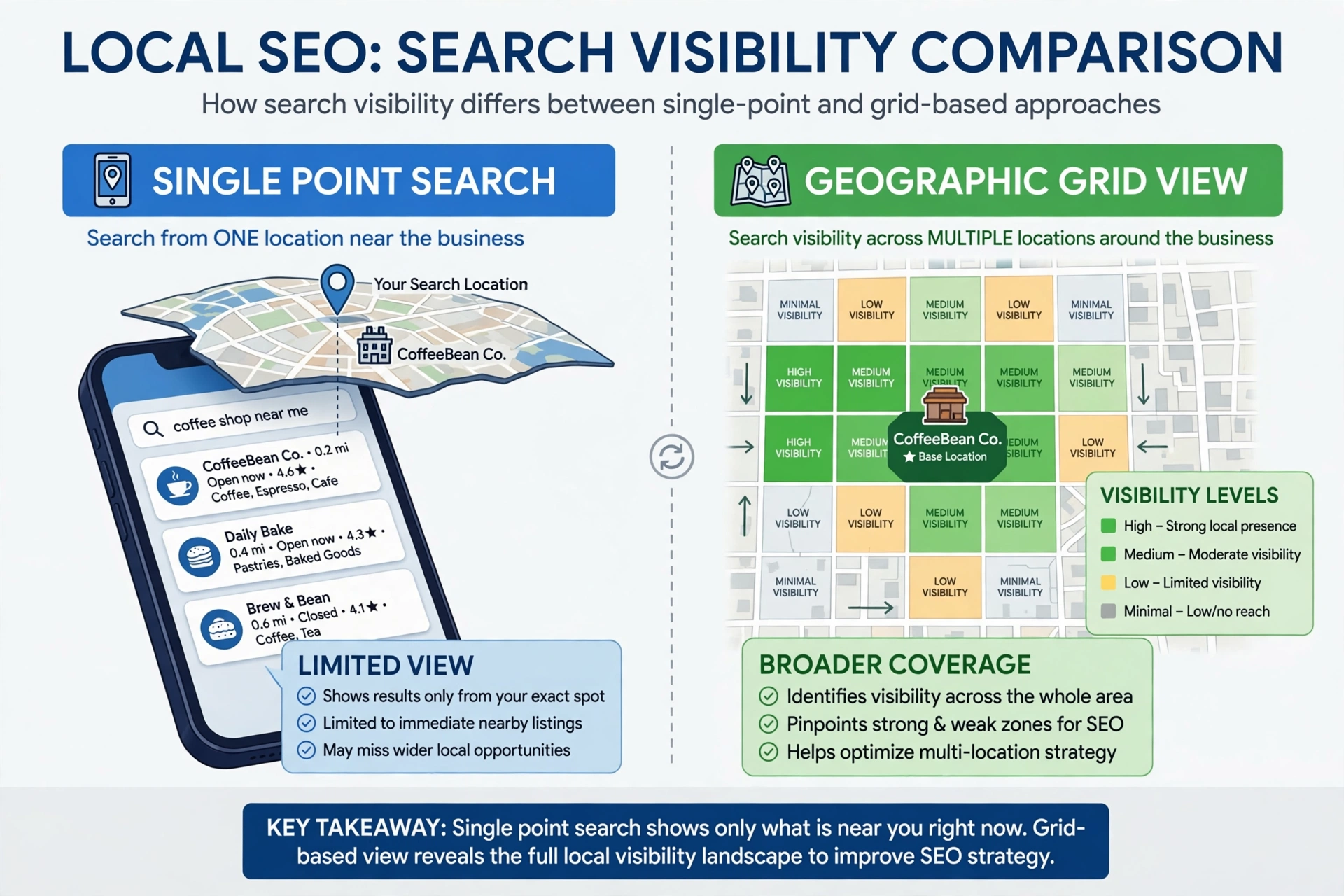
Why it matters: Local results vary depending on the searcher’s location and other factors. You may appear prominently outside your premises but have much lower visibility a few kilometres away.
Making major marketing decisions based on one search can lead to unnecessary spending or stopping work that is producing enquiries elsewhere.
How to Fix It
- Use a local rank grid tool such as Local Falcon, Whitespark Local Ranking Grids or BrightLocal to examine visibility across your service area.
- Review Google Business Profile Performance for calls, website clicks and other available interactions.
- Check Search Console for website impressions and clicks.
- Ask new customers how they found you and record the answer.
- Track enquiries and completed jobs, not just rankings.
Estimated time: About an hour to establish basic tracking.
Quick-Reference Table: 11 Local SEO Mistakes
| # | Mistake | Main concern | Estimated time to address |
|---|---|---|---|
| 1 | Wrong primary category | Relevance and visibility | 15 minutes |
| 2 | Keywords in business name | Policy and suspension risk | 5 minutes, plus review |
| 3 | NAP mismatches | Customer confusion and inconsistent listings | 2–4 hours |
| 4 | Home address showing or virtual office | Eligibility and suspension risk | 10 minutes, plus review |
| 5 | Wrong map pin | Directions and location accuracy | 5–15 minutes |
| 6 | Copy-paste town pages | Spam-policy and content-quality risk | 1–2 hours to audit |
| 7 | One page for all services | Weak service-specific information | 2–3 hours per page |
| 8 | Broken review process | Review-policy and trust concerns | 30 minutes |
| 9 | Poor review replies | Customer confidence and privacy | 1 hour, then weekly |
| 10 | Wrong or missing hours | Missed visits and enquiries | 15 minutes, then calendar checks |
| 11 | Judging from your own phone | Misleading performance decisions | 1 hour |
These times are planning estimates, not guaranteed completion times. Profile verification, directory ownership and website development can take longer.
Which Local SEO Mistakes Should You Fix First?
Start with errors that may affect profile eligibility, accuracy or customer access:
- Business name: remove unsupported keyword additions.
- Address type: make sure the profile represents a genuine storefront, hybrid or service-area business.
- Primary category: select the most accurate available category.
- Map pin: check that the location is correct.
- Hours: update regular and special hours.
Then work through the longer-term improvements: NAP clean-up, service pages, reviews and performance tracking.
If you want to check the whole setup systematically, use our local SEO audit checklist.
When This Advice May Not Apply
- Online-only businesses: Businesses without eligible in-person customer contact generally cannot have a Google Business Profile. Focus on standard organic SEO instead.
- Multi-location businesses: Separate locations introduce additional considerations, including duplicate listings, accurate location information and overlapping service areas.
- Already suspended: Correct the underlying policy issues before submitting an appeal. See our guide to suspended Google Business Profiles in Ireland.
For help diagnosing and fixing local visibility problems, see our local SEO services.
Frequently Asked Questions
What Is the Most Common Local SEO Mistake?
The wrong primary category and inconsistent business information are useful issues to check early because they are relatively straightforward to investigate. Whitespark’s 2026 survey placed primary category at the top of its Map Pack factor list, but that does not establish which mistake is most common among Irish businesses.
Can Adding Keywords to My Business Name Get My Profile Suspended?
Yes. Google requires your Business Profile name to reflect your real-world business name. Unnecessary keywords, locations or promotional phrases can violate its guidelines and may lead to suspension. A keyword should only be part of the name if it is genuinely part of the business’s real-world branding.
How Do I Know if My NAP Details Are Inconsistent?
Search your business name, current and old phone numbers, and any previous addresses in Google. Check your website, Google, Apple Maps, Bing Places, Facebook and relevant Irish directories such as GoldenPages.ie. Record the variations and update the listings you control.
Citation tools such as BrightLocal or Whitespark may help identify listings, but review the results manually before making changes.
Are Town Pages Bad for SEO?
No. Useful location pages can help customers understand where you work. The problem is publishing near-identical pages that only replace one town name with another, or creating pages that funnel visitors to the same destination without offering distinct value.
Build pages around real local services, work, coverage and useful information.
How Often Should I Check My Google Business Profile?
A monthly review is a sensible routine for many businesses. Check the name, category, address or service area, phone number, website and opening hours. Review special hours before public holidays and check for unexpected edits or changes.
The Takeaway: Fix These 11 Local SEO Mistakes
Set aside time this week to check your business name, address type, primary category, map pin and opening hours. These are practical starting points for reducing policy, accuracy and customer-access problems.
Then schedule a second session for directory consistency, service pages, reviews and tracking.
A structured audit can reveal issues that are easy to overlook when you only check your own Google Maps result.
If you would rather have your setup reviewed, contact KJK SEO.