A location page can be useful for local SEO when it genuinely helps someone in a specific town understand what you offer, where you work, and why they should choose you.
The problem is not creating pages for different towns. The problem is creating dozens of near-identical pages with only the town name changed.
Google’s current spam policies specifically describe doorway abuse as creating pages targeting specific regions or cities that funnel users elsewhere, as well as creating substantially similar pages that are closer to search results than a clearly defined, browsable site structure. Sites that violate Google’s spam policies may rank lower or not appear in Search at all.
For location pages SEO, the practical question is therefore not, “How many words should every town page have?”
It is:
What can this page tell a customer about this town that my other location pages cannot?
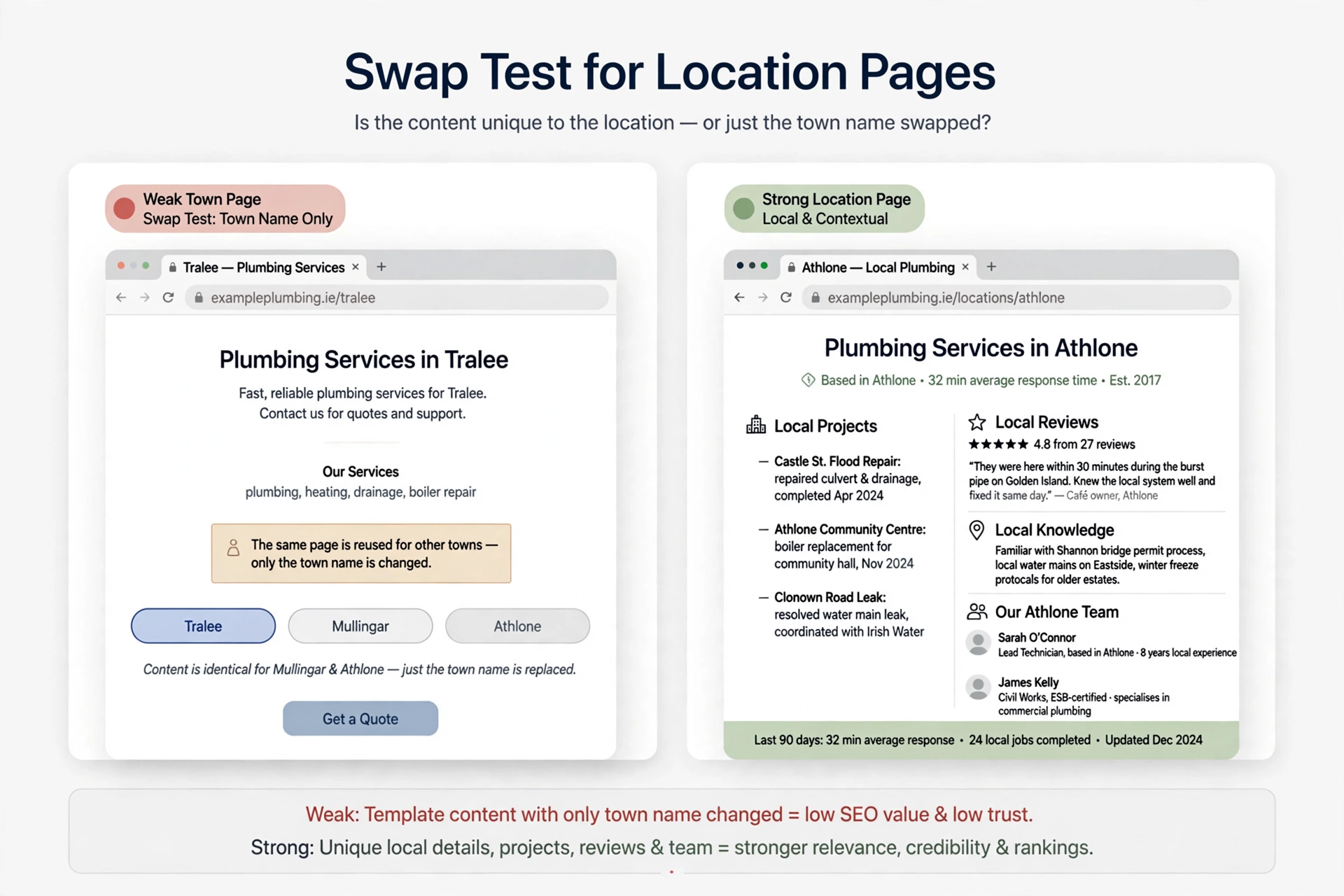
That is where the swap test becomes useful. Replace the town name with another town. If almost every sentence still works, the page probably does not contain enough genuinely local information.
Why Most Location Pages Fail
A typical weak town page looks something like this:
“Looking for a reliable plumber in Tullamore? Byrne Plumbing provides professional plumbing services in Tullamore and surrounding areas. Our Tullamore plumbers are experienced and affordable. Call our Tullamore team today!”
Now copy the same paragraph for Mullingar, Athlone, Portlaoise and Birr.
You have five URLs, but very little additional value.
These pages commonly fail for four reasons:
- They add little new information. A visitor cannot learn much more than they could from the main service page.
- They resemble a doorway-page pattern. Google’s spam policies specifically identify substantially similar city or regional pages as an example of doorway abuse.
- They provide weak conversion information. A customer still does not know what work you have actually done locally, how quickly you respond, or who will serve them.
- They can become a scaled-content problem. Google also warns against creating large numbers of unoriginal pages primarily to manipulate search rankings.
Google’s broader guidance also says people-first content should provide original information, substantial value, and first-hand expertise rather than being created primarily to attract search-engine visits. It specifically says there is no preferred word count.
What Google’s Doorway Policy Actually Means
Google describes doorway abuse as pages created to rank for specific, similar searches while leading users to pages that are less useful as the final destination.
Its examples include:
- Multiple pages or domains targeting specific cities or regions and funneling users to one page
- Pages generated to funnel visitors into the actual usable part of a site
- Substantially similar pages that sit closer to search results than a clearly defined, browsable site structure
That does not mean legitimate location pages are automatically bad for SEO.
A genuinely useful page about serving Naas, Cork, Tralee or another town can be appropriate when the business actually serves that area and the page gives visitors useful local information.
The distinction is simple:
A useful location page serves the customer first. A doorway page exists mainly to capture another search query.
There is also no safe word count that separates the two. Google explicitly advises against choosing a word count simply because you believe Google has a preferred number.
How Much Unique Content Does Each Location Page Need?
Google does not give a required word count for location pages.
Instead of aiming for 500, 800 or 1,500 words on every town page, use three practical tests.
1. The swap test
Replace the town name with another town you serve.
If almost every sentence still makes sense, the page is probably too generic.
A stronger page contains statements that would become inaccurate if you changed the location.
For example:
- “Most of our rewiring work in Stoneybatter involves older Victorian terraces with original electrical systems.”
- “We’re based close to Clane, so local emergency call-outs can often be handled more quickly than jobs farther away.”
- “Our Tralee team regularly works on EV charger installations in newer residential developments.”
These statements provide information about the location rather than simply inserting its name.
2. The customer test
Ask:
Would someone in this town learn something useful that they could not get from my main service page?
Useful local information could include:
- Typical response times
- Common property types
- Local projects
- Access or parking considerations
- Services particularly relevant to the area
- The team member who normally covers the area
- Local customer reviews
- Nearby areas served
- Local regulations or practical considerations
- Genuine photographs from completed work
If the answer is no, the page may not justify its own URL.
3. The evidence test
Ask:
Can I prove that this business actually works in this location?
Evidence could include:
- Photos from local jobs
- Genuine customer reviews
- Named projects
- Local case studies
- A staffed branch or office
- A named team member who covers the area
- A genuine history of work in the town
The stronger the evidence, the easier it is to create a page that feels genuinely local rather than generated from a template.
If a page fails all three tests, don’t force it. Consider consolidating the information into a useful “Areas We Cover” page instead.
Should You Create a Page for Every Town?
Usually, no.
Create a dedicated location page when several of these conditions are true:
- You get, or genuinely want, valuable work in the town.
- You can provide real local information.
- You have evidence that you serve the area.
- The town has enough commercial or search value to justify dedicated content.
- You can say something meaningfully different from your other location pages.
- The page gives visitors a useful destination rather than simply another keyword target.
Consider skipping a separate page when:
- You rarely work there.
- You would have to invent local information.
- The town is so close to another location that the content would be almost identical.
- You have no local projects, reviews, staff, branch or other evidence.
- The only real reason for creating the page is to target “[service] + [town].”
For many small businesses, a sensible starting point is three to five genuinely valuable locations, rather than launching 30 or 50 weak pages at once.
The exact number is not an SEO rule. It is a quality-control decision.
A Reusable Location Page Structure
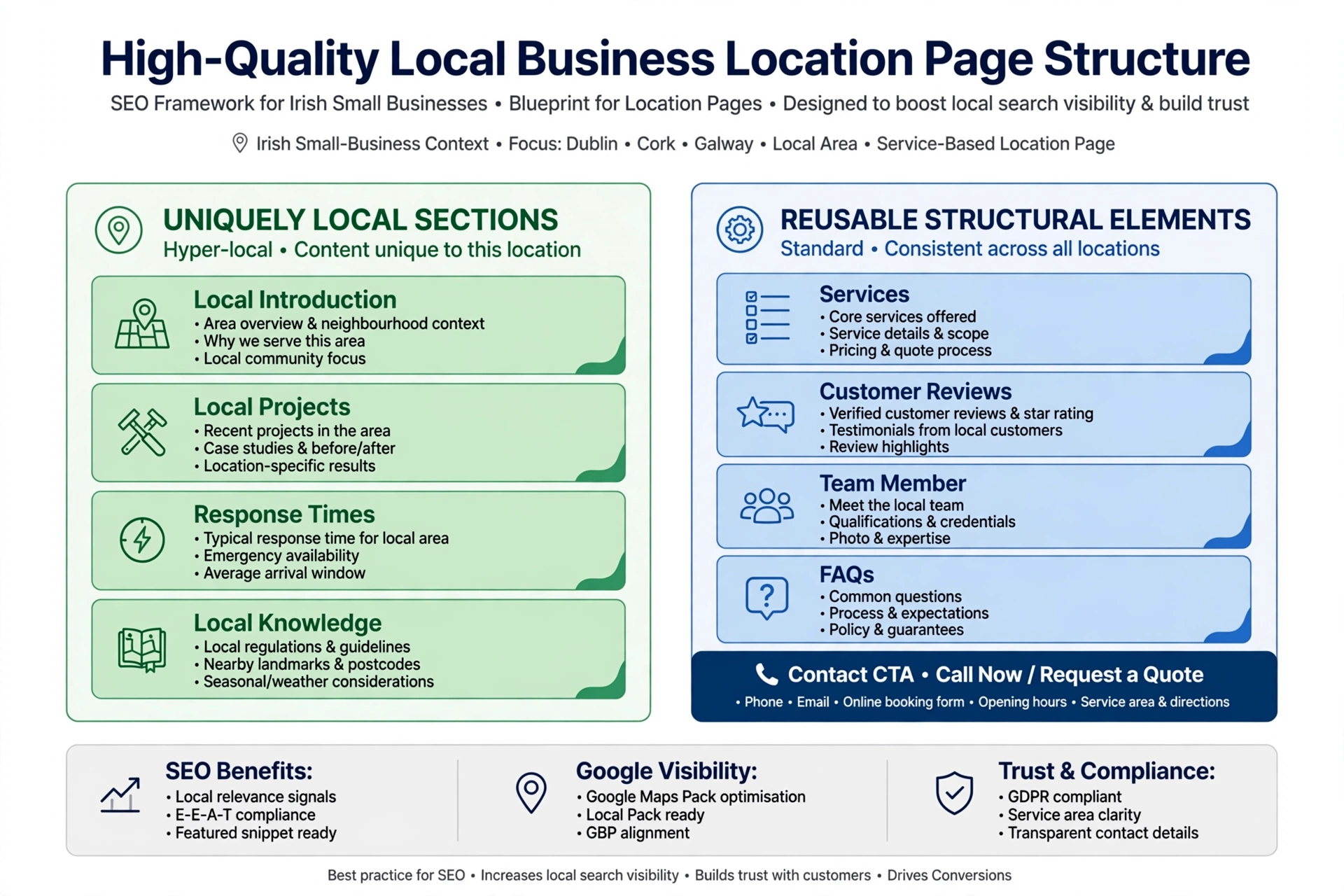
The best way to scale location pages SEO is to standardise the structure without standardising the substance.
Use the following framework:
| Section | Unique or shared? | What to include |
|---|---|---|
| 1. Headline and introduction | Unique | Service + town + genuinely local opening information |
| 2. Services available in [town] | Partly shared | Main services plus anything particularly relevant locally |
| 3. Local projects | Must be unique | 2–4 genuine jobs, with descriptions and photos where possible |
| 4. Response times and coverage | Must be unique | Base location, realistic response information and nearby coverage |
| 5. Local knowledge | Must be unique | Property types, common problems, access, parking or practical local factors |
| 6. Local customer reviews | Must be unique | Genuine reviews from customers in the area |
| 7. Who covers the area | Unique where possible | Named team member, branch or local contact |
| 8. Pricing guidance | Shared with local notes | General pricing plus relevant local variations |
| 9. FAQs | Mostly unique | Questions customers in that location actually ask |
| 10. Contact and CTA | Mostly shared | Phone, enquiry form, service-area information and next step |
The shared sections are not automatically a problem. The issue is when shared content makes up almost the entire page.
A useful rule is:
Standardise the framework. Personalise the evidence.
That approach lets you create location pages efficiently without turning your website into a collection of town-name substitutions.
Example: An Electrician’s Location Page for Tralee
Here is what a genuinely local page could look like.
Headline
Electrician in Tralee: Rewiring, Fuse Boards and EV Chargers
Introduction
“We’re based in Castleisland and work in Tralee regularly. The jobs we handle most often in the area include fuse-board upgrades in older homes and EV charger installations in newer residential properties.”
Local projects
- Full rewire of a 1960s bungalow near Oakpark, including a new consumer unit and certification.
- EV charger installation at a newer Tralee property, including assistance with the relevant grant paperwork.
Response times
“For emergency electrical work in Tralee, we aim to return calls within 15 minutes and attend the same day where practical.”
Local knowledge
“Older properties in parts of Tralee can have electrical systems that require additional checks before upgrading. We assess the existing installation before recommending the appropriate work.”
Local reviews
Include genuine reviews from Tralee customers, rather than generic testimonials with the town name added.
Who covers Tralee
“Seán, our senior electrician, handles most of our Tralee jobs.”
Local FAQs
- Do you charge a call-out fee in Tralee?
- How quickly can you attend an electrical emergency?
- Can you help with an EV charger installation?
- Do you provide certification after electrical work?
The important part is not the wording of this example.
It is the evidence behind the wording.
Do not claim local projects, response times, team members or property observations unless they are true.
How to Gather Local Content Even If You’re Not a Writer
The biggest challenge with location pages is often not SEO. It is collecting enough real information to make each page different.
You can solve that with a simple content-collection system.
Keep a job log
After every job, record:
- Town
- Date
- Type of work
- One-sentence description
- Property type
- Problem encountered
- Solution provided
- Before-and-after photographs
- Relevant customer feedback
Five minutes of documentation after a job can eventually give you enough material for multiple useful local pages.
Ask for reviews
Encourage genuine customers to leave reviews after completed work.
Do not manufacture location-specific reviews or rewrite customer comments to insert keywords.
Record voice notes
If you’re travelling between jobs, record a short voice note:
“Today I worked on a 1970s bungalow in Tralee. The customer had an old fuse board and wanted an EV charger installed…”
A writer can later turn that real experience into useful page content.
Review your search data
Use Search Console and your available Business Profile performance data to understand which locations and queries are actually generating visibility and enquiries.
That information can help you decide which locations deserve dedicated pages rather than simply creating pages for every nearby town.
On-Page SEO Basics for Location Pages
A good location page still needs standard on-page SEO.
Page title
Use a clear format such as:
[Service] in [Town] | [Business Name]
For example:
Electrician in Tralee | Byrne Electrical
URL
Keep URLs short and consistent:
/electrician-tralee/
or:
/areas/tralee/
Choose one structure and use it consistently.
Main heading
Use one clear H1 describing the service and location.
Avoid creating multiple competing H1 headings simply to include variations of the town keyword.
Internal links
Link to location pages from:
- Relevant service pages
- Your main “Areas We Cover” page
- Relevant blog content
- Other genuinely useful location or service resources
Then link back from the location page to the relevant service pages.
A clear internal-link structure helps users and search engines navigate the site.
Business details
Use your genuine business information.
Do not create a fake local address, office, phone number or team member simply to make a town page appear more local.
Schema
Use LocalBusiness structured data for genuine business locations where appropriate. For service-area businesses, location markup needs to reflect the actual business rather than inventing a physical branch.
You can also use areaServed where appropriate.
For more detail, see our guide to local business schema markup.
Multi-location businesses
If a business has genuinely staffed physical branches, each real location can have its own dedicated page with accurate branch information.
The location page should represent the actual branch rather than acting as a city keyword page.
What Should You Do With Existing Thin Town Pages?
If you already have dozens of location pages, don’t automatically delete everything.
Audit them first.
1. List every location page
Review:
- Organic clicks
- Impressions
- Queries
- Leads
- Enquiries
- Actual work generated
- Local evidence available
Search Console can help you understand how individual URLs perform in Google Search.
2. Keep and improve valuable pages
If a page brings relevant traffic, enquiries or actual business, look for ways to make it substantially more useful.
Add real local evidence rather than simply adding more words.
3. Consolidate weak pages
If several pages target nearby locations but contain almost identical information, consider combining them into a stronger “Areas We Cover” page where appropriate.
If you consolidate URLs, use redirects carefully so users and search engines are sent to the most relevant destination.
4. Remove pages that have no useful purpose
A page with no meaningful traffic, no business value, no local evidence and no realistic reason to exist may not need to remain a standalone location page.
Do not delete pages solely because they have low traffic. Consider their business purpose and whether they can be improved first.
5. Remove keyword-stuffed town blocks
Do not add long lists of towns to footers, sidebars or pages simply to capture searches.
Google’s spam documentation includes keyword stuffing among its spam practices, including blocks of city names intended to manipulate rankings.
A clean navigation structure such as:
Areas We Cover → Dublin → Tallaght → Swords → Clondalkin
is fundamentally different from hiding dozens of town names in a footer.
Common Location Page Mistakes
| Mistake | Better approach |
|---|---|
| Same text with the town name swapped | Build the page around real local evidence |
| Pages for towns you rarely serve | Consolidate where appropriate |
| Repeating the town name excessively | Use natural language |
| Stock photos everywhere | Use genuine local project photographs where possible |
| Fake local addresses | Use only genuine business information |
| No internal links | Connect service, location and area pages logically |
| Creating 50 pages immediately | Start with a small number of valuable locations |
| Generic testimonials | Use genuine customer reviews |
| Invented local facts | Only publish information you can verify |
| Adding words just to hit a target | Focus on useful, location-specific information |
When Location Pages May Not Be Necessary
Not every business needs a large location-page architecture.
Single-location businesses
A business with one physical storefront may get more value from a strong homepage, location information, services and contact page than from dozens of town pages.
Multi-location businesses
Businesses with genuinely staffed branches can benefit from dedicated pages for each actual location.
Those pages should contain accurate branch information and meaningful local details.
Service-area businesses
A service-area business can target the areas it genuinely serves, but it should not invent branches or addresses for locations where it has no physical presence.
National online businesses
An online business with no meaningful local operation usually has little reason to create dozens of town pages simply because people search for its service in different locations.
The correct page architecture depends on the actual business model.
For broader local search strategy, see our local SEO services. For a city-focused example, see our SEO services in Cork.
FAQ
Are location pages bad for SEO?
No. A location page can be useful when it genuinely helps customers in a specific location.
The problem is creating substantially similar pages primarily to capture different city or regional searches. Google explicitly identifies certain city and region page patterns as examples of doorway abuse.
How many words should a location page have?
There is no Google-approved word count for location pages.
Google explicitly advises against writing to a particular word count because you believe Google has a preferred length.
Instead, use the swap test, customer test and evidence test.
A shorter page containing genuine local information can be more useful than a long page filled with generic copy.
Can I use a template for location pages?
Yes.
Use a template for the structure, such as headings, navigation, contact information and common service information.
But the important local sections should be genuinely different.
Local projects, response information, local knowledge, customer reviews and other evidence should come from the actual location rather than being generated by replacing one town name with another.
What are doorway pages?
Google describes doorway abuse as creating pages to rank for specific, similar searches that lead users to less useful intermediate pages.
Its examples include pages targeting specific cities or regions that funnel users elsewhere, as well as substantially similar pages that sit closer to search results than a clearly defined site hierarchy.
Should I delete my thin town pages?
Not automatically.
First determine whether each page generates relevant traffic, enquiries, customers or other business value.
Improve pages that have a genuine purpose. Consolidate overlapping pages where appropriate. Remove or redirect pages that have no useful purpose after considering their role in the site’s architecture.
The goal is not to have fewer URLs for the sake of having fewer URLs.
The goal is to have useful URLs that deserve to exist.
The Takeaway
Open your location pages side by side and run the swap test.
Change “Tralee” to “Mullingar.” Then change it to “Athlone.”
If almost everything still makes sense, the pages probably need more genuine local information.
Focus on:
- Real local projects
- Genuine customer reviews
- Realistic response information
- Local knowledge
- The people serving the area
- Useful location-specific FAQs
- Genuine photographs and evidence
You do not need to hit an arbitrary word count.
You need to create a page that gives someone in that town a reason to choose it over a generic service page.
Start with your three to five most valuable locations, make those pages genuinely useful, and build a simple job log so you have real local material to work with as your business grows.
Sources: Google Search spam policies · Google: creating helpful, reliable, people-first content · Google Search Central documentation