This guide to service area business google maps explains setup, service areas, and common mistakes.
service area business on Google Maps can appear in local search without a shop or office that customers visit. Plumbers, electricians, roofers, cleaners, mobile mechanics and home care providers can all use a Google Business Profile designed for businesses that travel to customers.
To set it up correctly:
- Choose the service-area business setup in Google Business Profile.
- Hide your real address if customers do not visit you there.
- List the towns and areas you genuinely serve.
- Support your profile with useful website pages, genuine reviews and consistent business details.
Never use a fake address, virtual office or borrowed location to appear closer to customers. These arrangements can breach Google’s guidelines and put your profile at risk of suspension.
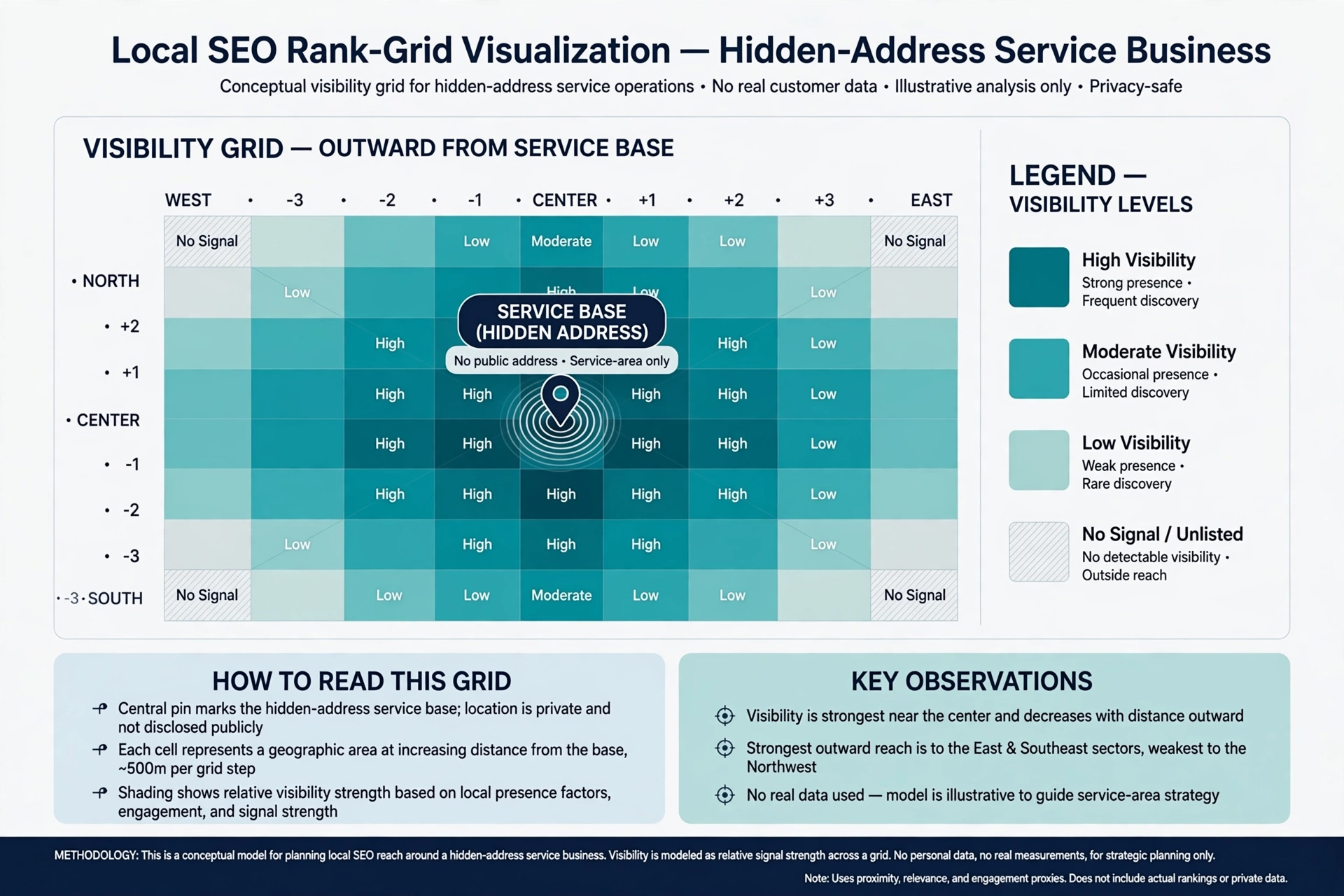
Your visibility will generally be strongest around your real business base. That is the starting point for a realistic local SEO strategy.
At KJK SEO, we work with Irish service-area businesses on Google Maps visibility — including plumbers, electricians, roofers and home care providers. This guide covers what actually matters when there is no shopfront involved.
What Is a Service Area Business?
Google defines a service-area business as a business that visits or delivers to customers directly, rather than serving them at its business address.
Common Irish examples include:
- Plumbers, electricians and roofers
- Home care providers
- Cleaners and window cleaners
- Mobile mechanics and car valeting businesses
- Landscapers and gardeners
- Mobile dog groomers, hairdressers and beauty therapists
- Locksmiths and pest control companies
If customers do not visit your premises, you can still have a Google Business Profile. The important distinction is representing your actual operation accurately.
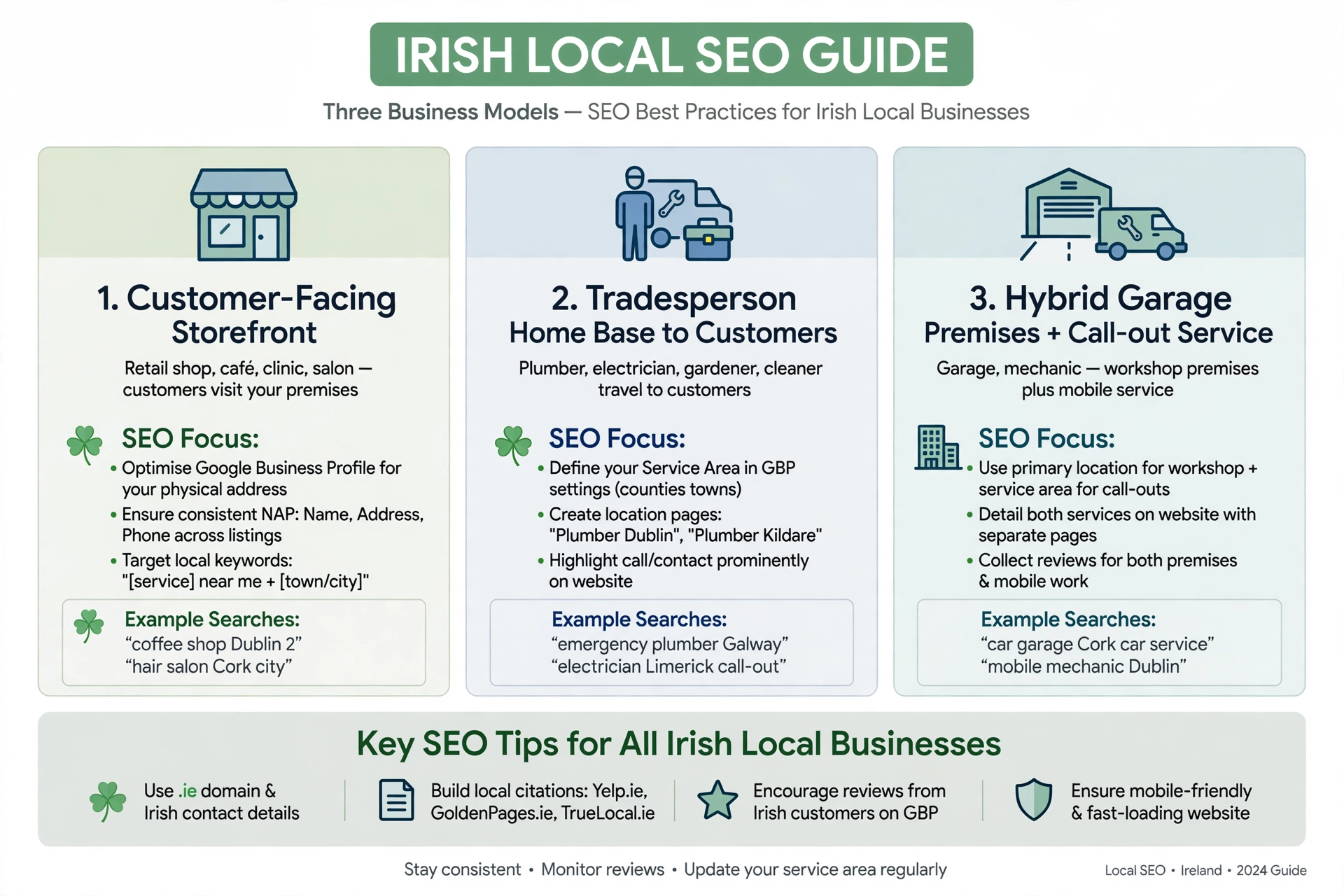
Storefront vs Service-Area vs Hybrid Businesses
| Business type | What it means | Example | Address on Google |
|---|---|---|---|
| Storefront | Customers visit during business hours, with permanent signage | Hair salon in Athlone | Show the eligible address |
| Service-area | You travel to customers, who do not visit your premises | Plumber working from home in Tuam | Hide the address and add service areas |
| Hybrid | Customers visit your premises and you also travel to them | Garage offering repairs and roadside call-outs | Show the address and add service areas |
Google requires a business displaying its address to have permanent fixed signage. A service-area business without a qualifying customer-facing location should use one profile for its service operation.
Businesses with genuinely separate locations, separate staff and separate service areas may qualify for individual profiles for those locations.
How to Set Up Your Google Business Profile Correctly
Start at Google Business Profile and search for your business before creating a new listing. This helps avoid accidental duplicates.
Follow these steps:
- Enter your real business name. Use the name customers know, without adding extra town names or keywords.
- Answer the location question honestly. If customers do not visit your address, select the option indicating that you serve customers at their locations.
- Hide your address. Use your genuine operating address for the profile and verification, but do not display it publicly when customers are not served there.
- Add your service areas. Select the towns, postcodes or other areas you actually cover.
- Choose your primary category. Examples include Plumber, Home Health Care Service or House Cleaning Service.
- Add your phone number and website. Use contact details that represent the actual business.
- Complete verification. Google may request video verification or another available method.
Verification for Home-Based Businesses
A home-based service business can still complete verification without displaying its residential address to customers.
Google’s guide to video verification describes the evidence that may be required, such as:
- Nearby landmarks or signs establishing the location
- Tools, equipment or a branded vehicle used for the business
- Evidence that you manage the business, such as business documents or invoices
Follow the specific instructions shown in your Business Profile. Verification requirements can vary, and submitting a video does not guarantee approval.
Choose Service Areas That Reflect Where You Actually Work
Google allows a service-area business to select up to 20 service areas. These can be cities, postcodes or other recognised areas.
Google’s guide to managing service areas also says:
- You cannot define a radius around your business.
- Your overall service area should generally be within about two hours’ driving time of your base, although Google notes that larger areas may be appropriate for some businesses.
- You should be as specific and accurate as possible.
- Changes can take time to appear.
More areas do not automatically mean more rankings.
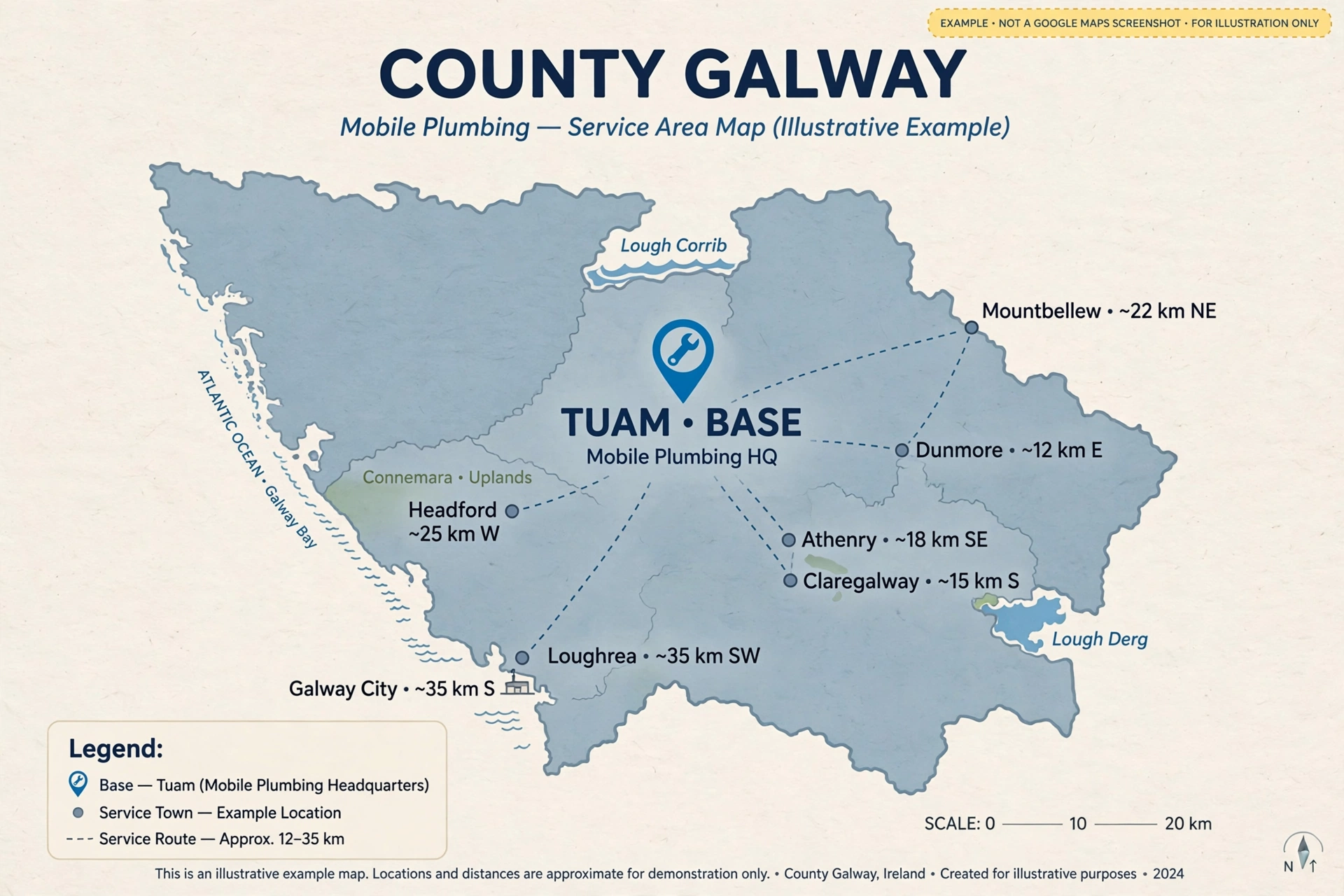
Why Your Real Base Still Matters
Industry research and local SEO observations indicate that hiding an address does not make the business geographically location-free. Google can still use the business’s underlying location when determining local results.
For example, a mobile mechanic based in Ennis might list:
- Ennis
- Clarecastle
- Newmarket-on-Fergus
- Shannon
- Sixmilebridge
- Ennistymon
- Kilrush
The business may be most visible around Ennis, with visibility varying across the other towns and by the searcher’s location.
Treat service areas as an accurate description of where you work, not a list of locations where you expect guaranteed rankings.
When Should You Hide Your Address?
Hide your address when:
- Customers never visit your business address.
- You operate from home and travel to customers.
- Your premises are used only for administration, storage or vehicle parking.
- You do not have a qualifying customer-facing location.
Google’s guidance is clear: if you do not serve customers at your business address, remove that address from the public Business Profile and enter your service areas instead.
Keep your address visible when customers genuinely visit you during stated hours and the location meets Google’s requirements, including permanent signage.
Don’t Use Fake Addresses or Virtual Locations
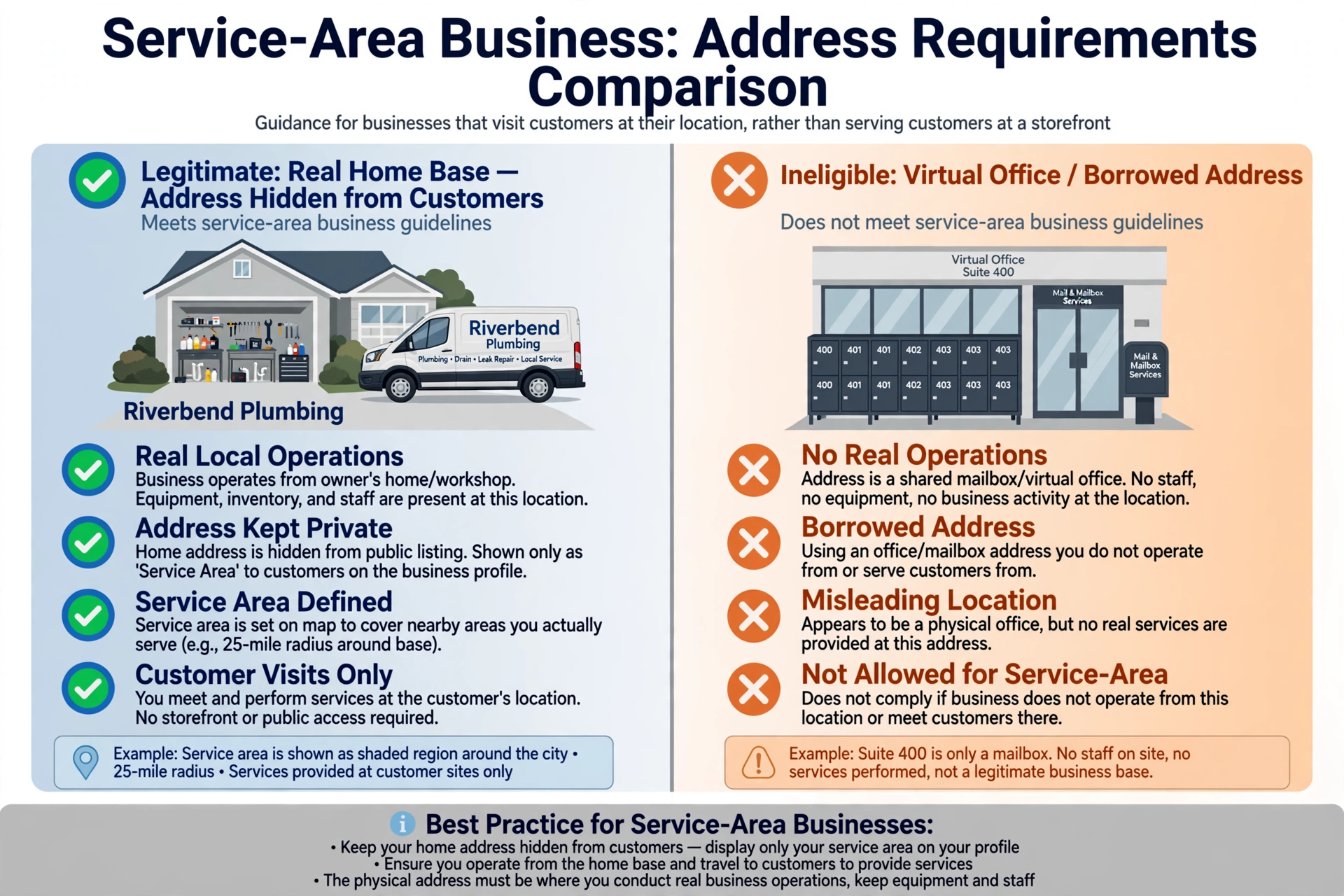
Hiding a real address is legitimate. Inventing one is not.
| Legitimate setup | Problematic setup |
|---|---|
| Your real home or yard address, hidden from customers | Virtual office where you do not operate |
| Genuine staffed branch with its own team | Coworking hot desk used only for a listing |
| One profile for your actual service operation | Borrowed address in another town |
| Separate eligible locations with separate staff | PO box or remote mail-forwarding address |
| Accurate service areas | Duplicate profiles created to target extra towns |
Google does not allow a business to use a virtual office address unless it meets the applicable staffing and operational requirements. A coworking location must have clear signage, receive customers during opening hours and be staffed by your business’s own team. See Google’s guidelines for representing your business.
Why Fake Locations Can Backfire
Using an address that does not represent your business can lead to:
- Profile suspension or loss of visibility
- Time spent resolving verification problems
- Confusion for customers
- Inconsistent business information across platforms
Add Accurate Services and Business Information
Your Google Business Profile should explain what you do and how customers can contact you.
Complete these sections carefully:
- Services: Add each main service separately where the profile supports it.
- Hours: Use the hours when you genuinely accept or respond to customer enquiries.
- Description: Explain what you do, who you help and where you operate.
- Photos: Add genuine images of completed work, your team, equipment and branded vehicle.
- Phone: Use one main business number consistently.
If you add structured data to service pages, follow Google’s LocalBusiness structured data documentation.
Some sectors have additional registration or regulatory requirements. For relevant guidance, see our SEO guide for home care services.
Build Useful Service and Location Pages
Your website can support your Google Maps presence by clearly explaining your services and the areas you cover.
Create a Page for Each Main Service
A useful service page should explain:
- What the service includes
- Who it is suitable for
- How the process works
- Pricing or factors affecting cost, where appropriate
- Genuine project photos or examples
- The areas you serve
- How to request a quote or appointment
For example, a plumber might have separate pages for emergency plumbing, boiler servicing and bathroom plumbing.
Create Location Pages With Real Local Value
A useful location page should include information that genuinely relates to that area, such as:
- Real jobs or clients, where permission allows
- Accurate travel or response-time information
- Area-specific service details
- Genuine customer feedback
- Clear contact and enquiry options
An “Areas We Cover” page with a simple map can help customers understand your coverage.
Avoid creating dozens of near-identical pages that only swap town names. Google’s spam policies identify doorway abuse and keyword stuffing as practices to avoid.
What to Show Instead of a Street Address
If customers do not visit your premises, your website can still provide useful location information without publishing your residential street address.
Consider showing:
- Business name and phone number
- Town or county where the business is based
- Areas served
- Contact form and service information
- Registered business details where legally required
For example: “Based in Tuam, Co. Galway. Serving customers across Galway and nearby areas.”
Get Genuine Reviews From Customers Across Your Areas
Reviews help prospective customers understand the service and experience they can expect.
Use a consistent process:
- Ask every customer for an honest review after the job.
- Use the same neutral request for all customers.
- Do not ask reviewers to mention a particular town or keyword.
- Do not offer incentives or pressure customers.
- Reply to reviews professionally.
For example, a landscaper in Wexford might request a review from every customer after the final visit. Over time, genuine reviews may naturally come from Wexford town, Rosslare, Enniscorthy and New Ross.
Read our guide on how to get more Google reviews.
Keep Business Details Consistent Across Directories
Your business information should be accurate and recognisable across the platforms where customers find you.
Check:
- Name and phone: Keep these consistent.
- Address: Hide it where the platform supports that option. If an address is required, use your real business address in the correct format.
- Service areas: Keep your coverage broadly consistent with where you actually operate.
- Business category: Choose the closest accurate category available.
Useful places to review include Google Business Profile, Apple Business Connect, Bing Places, GoldenPages.ie and relevant trade or sector directories.
See our guide to Irish business directories for SEO.
Use Local Content and Links to Build Geographic Relevance
Local visibility is supported by a website that demonstrates genuine relevance to the places and customers you serve.
Publish Useful Local Content
Create content that answers real customer questions. Examples include:
- How to prepare a home for a plumbing repair
- What to check before hiring a local electrician
- Seasonal garden maintenance advice for Irish conditions
- Questions to ask when arranging home care
Avoid publishing thin articles that simply repeat town names.
Earn Genuine Local Links and Mentions
Relevant opportunities may include:
- Local chambers of commerce
- Community groups and GAA clubs
- Local news coverage
- Supplier or approved-installer listings
- Genuine partnerships and sponsorships
If a link is paid or part of a sponsorship, use the appropriate link qualification. Google’s guidance explains how to qualify paid links.
Read our link building guide for Irish businesses.
Track Google Maps Visibility, Calls and Enquiries
A service-area business should measure where it appears, not just whether it appears for one search from its base town.
| What to track | How |
|---|---|
| Visibility across service areas | Local rank grid tools such as Local Falcon or Whitespark Local Ranking Grids |
| Calls, website clicks and searches | Google Business Profile Performance |
| Search impressions and clicks | Google Search Console |
| Form enquiries and phone taps | Google Analytics 4 key events |
| Where each job came from | Ask “How did you find us?” and record the town |
Why Grid Tracking Matters
A grid scan checks rankings from multiple points across a geographic area. It can show where your business appears prominently, where visibility is weaker and how results vary with distance.
Use tracking to guide decisions about service pages, content and coverage. Do not treat a single scan as a permanent ranking position.
Examples: Service-Area SEO for Different Irish Businesses
| Business | Base | Example service areas | Useful website pages |
|---|---|---|---|
| Home care provider | Office in Naas, used for administration | Naas, Newbridge, Kildare town, Clane, Kilcullen | Service pages and area information with coordinator details |
| Plumber | Home in Tuam | Tuam, Headford, Athenry, Claregalway, Galway city east | Emergency plumbing, boiler service and useful town pages |
| Cleaning company | Unit in Blanchardstown, used for storage | Dublin 15, Castleknock, Lucan, Clonsilla | Office cleaning, end-of-tenancy cleaning and relevant area pages |
| Mobile mechanic | Home in Ennis | Ennis, Shannon, Clarecastle, Ennistymon | Roadside repairs, mobile servicing and pricing |
| Landscaper | Yard near Enniscorthy | Enniscorthy, Wexford town, New Ross, Gorey | Garden design, maintenance and project gallery |
These are illustrative examples, not recommended service-area boundaries for every business. Each business should select areas based on its actual base, operating model and customer coverage.
Common Service-Area SEO Mistakes
| Mistake | Why it causes problems | What to do instead |
|---|---|---|
| Showing a home address when customers do not visit | May conflict with service-area profile requirements | Hide the address and add genuine service areas |
| Using a virtual office or PO box | May make the location ineligible | Represent the real operating location |
| Creating extra profiles for nearby towns | Can violate profile eligibility rules | Use one accurate profile unless separate locations genuinely qualify |
| Listing areas beyond realistic travel distance | May conflict with Google’s service-area guidance | Keep coverage accurate and practical |
| Expecting to rank everywhere listed | Service-area selection does not guarantee visibility | Build useful content and measure results by location |
| Repeating town names unnaturally | Can become keyword stuffing or doorway content | Create useful area information |
| Using different addresses across directories | Creates inconsistent business information | Hide where supported; otherwise use accurate details consistently |
When This Advice May Not Apply
Some business models need a different setup.
- Multi-location businesses: Separate, genuine staffed locations may qualify for individual profiles. Each location must meet Google’s requirements.
- Hybrid businesses: If customers visit your premises and you travel to them, show the eligible address and add service areas.
- Age-restricted businesses: Google restricts certain businesses involving products or services with minimum-age requirements from operating as service-area businesses without a storefront.
For help with your setup, see our local SEO services.
Frequently Asked Questions
Can I Rank on Google Maps Without a Shop or Office?
Yes. A qualifying service-area business can use Google Business Profile without displaying a customer-facing shop address. Hide the address if customers do not visit you, add the areas you genuinely serve and keep your profile accurate. Visibility will generally be strongest around your real base, so begin with your core operating area.
How Do I Hide My Address on Google Business Profile?
Open your Business Profile settings, edit the location information and remove the public address if customers are not served there. Then enter your service areas. Google may still use your real address for verification and location purposes, even when it is hidden from customers.
How Many Service Areas Can I Add?
Google allows up to 20 service areas, using towns, postcodes or other recognised areas. Its guidance says the overall area should generally be within about two hours’ driving time of your base, although some businesses may qualify for a larger area. Listing an area does not guarantee visibility there.
Can I Use a Virtual Office to Appear in Another Town?
Not simply to create a Google Maps presence in that town. Google says virtual offices are not eligible unless the location meets its applicable staffing and operating requirements. Use your real business location and do not create duplicate profiles to target extra towns.
Why Don’t I Rank in All My Service Areas?
Local results vary by the searcher’s location and other factors. Distance is one of the main local ranking considerations, so a business may appear more prominently near its real base than in towns farther away. Build relevant service information, earn genuine reviews and use grid tracking to understand geographic visibility.
The Takeaway: Build Local Visibility Without a Shopfront
A service-area business can build Google Maps visibility without inviting customers to a shop or office. The key is to represent the business honestly and build useful evidence of its services and coverage.
- Set up the profile as a service-area business and hide the address when customers do not visit.
- List only areas you genuinely serve.
- Maintain one accurate profile for each eligible business location.
- Build useful service pages and a small number of genuinely helpful location pages.
- Ask customers for honest reviews without scripting what they should say.
- Track where you appear and grow your local visibility outward from your real base.
The goal is not to claim every town on a map. It is to help the right customers understand what you do, where you work and how to contact you.