A Google Business Profile Ireland listing is the free business profile that controls how your business can appear across Google Search and Google Maps.
Setting one up properly in Ireland comes down to seven practical jobs:
- Create or claim the profile.
- Verify the business.
- Choose the most specific primary category.
- Complete your business information.
- Add and optimise your services.
- Upload useful, authentic photos.
- Keep the profile accurate and within Google’s guidelines.
If you’ve searched for Google My Business Ireland, you’re looking for the same core product under its former name: Google Business Profile.
Before You Start: Is Your Business Eligible for a Google Business Profile?
Before creating a Google Business Profile Ireland listing, make sure your business is eligible.
Google says a Business Profile is intended for businesses with a physical location customers can visit or businesses that travel to customers. Online-only businesses without in-person services aren’t eligible.
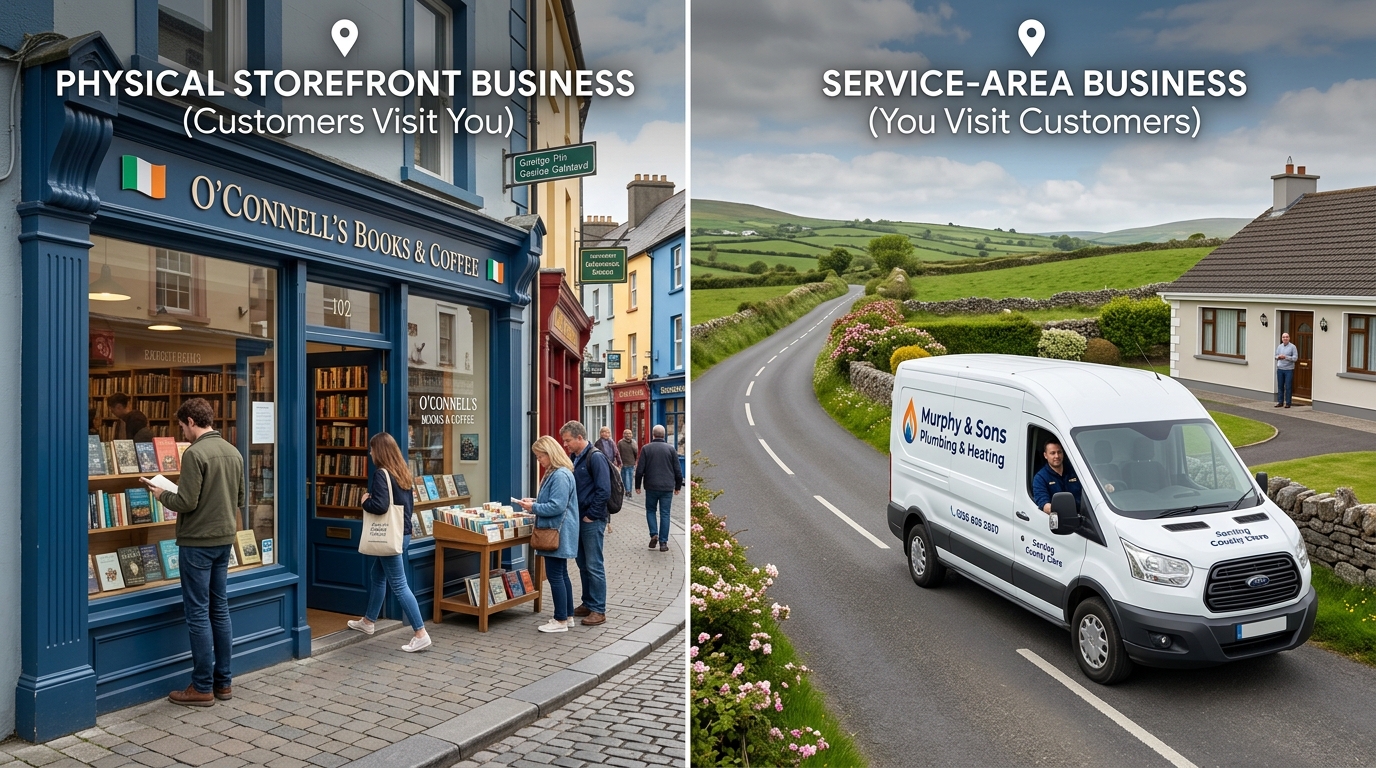
There are three common business types:
Storefront business
Customers visit your business at its physical location during business hours.
Examples include:
- A café in Galway
- A dental practice in Limerick
- A retail shop in Dublin
Service-area business
You travel to customers and don’t serve them at your listed business address.
Examples include:
- A plumber in Wexford
- A mobile dog groomer in Kildare
- A tradesperson serving several nearby towns
If customers don’t visit your location, Google says you shouldn’t display your business address publicly.
Hybrid business
You serve customers at your location while also travelling to customers or delivering services.
For example, a restaurant may serve customers at its premises while also offering delivery.
Have these details ready
Before setting up your Google Business Profile Ireland, prepare:
- Exact trading name
- Full business address and Eircode, where applicable
- Local phone number
- Website URL
- Opening hours
- List of services
- At least 10 genuine business photos
Step 1: Create or Claim Your Google Business Profile Ireland Listing
Start by searching for your business on Google before creating a new profile.
Google may already have created a basic listing for your business. Claiming an existing profile can preserve the information and reviews already associated with it.
If someone else controls the profile, such as a former employee or agency, use Google’s ownership/access process rather than creating a duplicate profile.
When entering your information:
Business name
Use the business’s real-world name exactly as it is represented on your signage, website and business materials.
Don’t add extra keywords, locations or services simply to influence rankings. Google’s guidelines require businesses to represent themselves accurately and state that unnecessary information in the business name can result in suspension.
Location
Add your address if customers actually visit you.
If customers don’t visit your business address, use the service-area setup instead.
Phone and website
Use a legitimate business phone number and link to the most relevant page on your website.
Ownership
Make sure your business — not your web designer or marketing agency — retains primary ownership of the profile.
Add agencies and other people as managers when appropriate.
Step 2: Verify Your Business
Verification is one of the most important parts of setting up a Google Business Profile Ireland listing.
Google determines which verification methods are available for a particular business. These can vary according to the business and its circumstances.
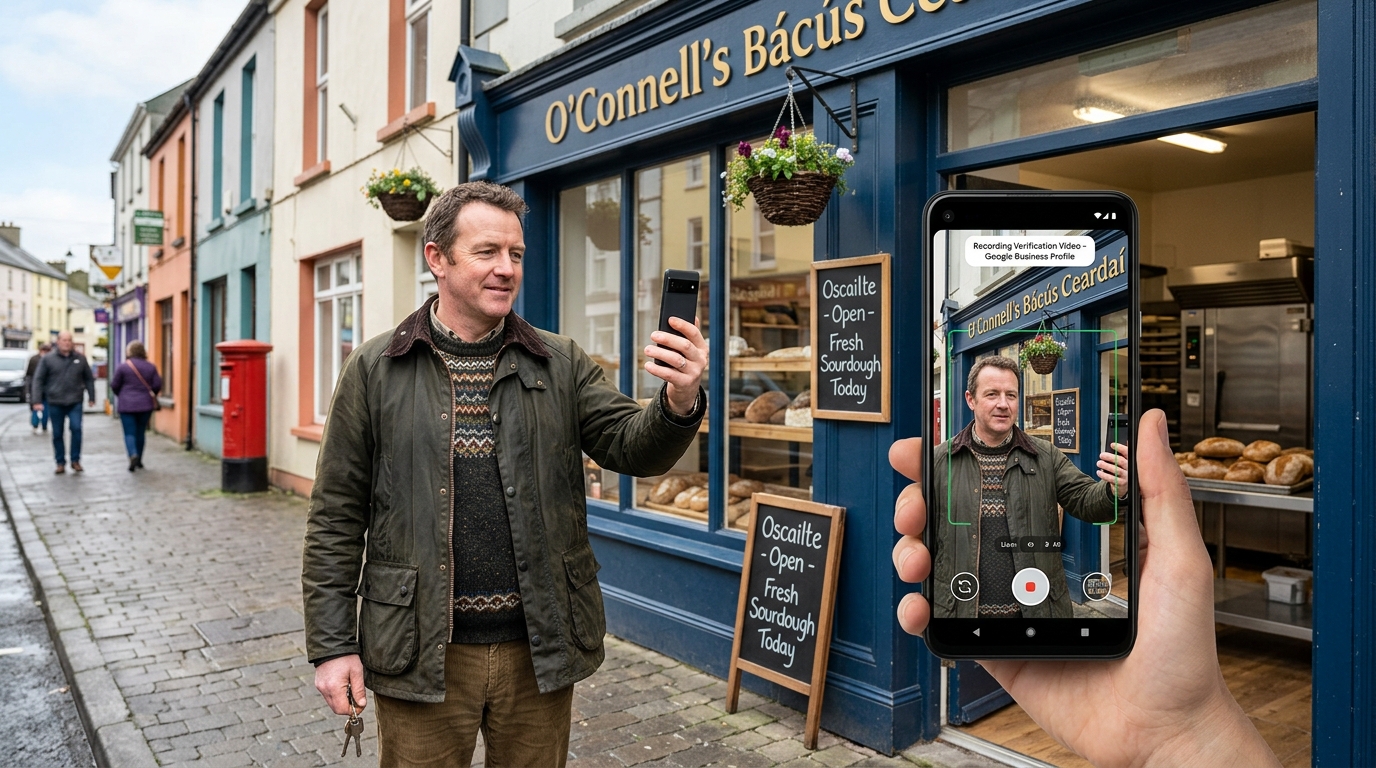
Video verification is one method Google currently uses for eligible businesses. Google states that the verification video must be recorded live, be unedited and continuous, and last at least 30 seconds. It must be recorded and uploaded through the Business Profile on a mobile device.
What your verification video must show
Your video should establish three things:
- Where the business is located
- That the business actually exists
- That you manage or represent the business
For a storefront or hybrid business, Google says the video can show street signs, building numbers, nearby businesses, permanent signage and business-only areas such as a till, kitchen or storage room.
For a service-area business, the video can show nearby landmarks or signs, professional equipment, branded vehicles, your workspace and documents such as a permit, invoice or utility bill matching the business name.
Important video restrictions
Your verification video shouldn’t contain:
- Bank account information
- Tax numbers
- Government ID numbers
- Private information
- Other people’s faces
Google currently states that video reviews can take up to five business days. If the video isn’t accepted, Google provides the issues that need to be addressed before another recording is submitted.
Practical tip for rural Irish businesses
Rural Irish addresses can sometimes be difficult to identify visually.
If there isn’t an obvious street sign or house number, plan your route beforehand and capture nearby signs, landmarks or other location identifiers that help establish where the business is located.
Step 3: Choose the Right Primary and Secondary Categories
Your primary category tells Google what your business does.
Google recommends choosing the most specific category available that accurately represents the business. Google also states that selected categories affect local ranking.
Follow these rules:
- Choose the most specific relevant category.
- Don’t add categories for every product or service.
- Use additional categories only when they genuinely describe the business.
For example, if the available category accurately describes your core business as a Nail salon, don’t select a broad category such as Salon simply because it sounds more general.
How to research your category
- Search your main service in your target Irish town or city.
- Examine the primary categories used by relevant competitors.
- Review Google’s available category suggestions.
- Select the most specific category that honestly describes your business.
Don’t assume an American category name is available in Ireland. Google provides regional category options, and its English-UK guidance includes examples such as “Grocery shop” and “Chemist.”
For a broader local search strategy, see our guide to ranking on Google Maps in Ireland.
Step 4: Complete Your Business Information Accurately
Once your Google Business Profile Ireland listing is verified, optimise every available field carefully.
Accuracy is more important than trying to manipulate individual fields for rankings.
Opening hours
Enter your actual opening hours and keep special hours updated around Irish public holidays.
Customers need accurate information about whether your business is open when they search.
Business description
Google allows up to 750 characters in the Business Profile description. Google says the description should focus on useful information about the business rather than promotions, prices or sales, and links aren’t allowed in the description.
A useful structure is:
- What you do and where you operate
- Who you serve
- What differentiates your business
- How long you’ve been operating
For example:
Family-run electrical contractors based in Mallow, serving homes and farms across North Cork since 2009. We handle rewiring, EV charger installation and SEAI-registered solar PV…
Business attributes
Add every attribute that genuinely applies to your business.
Examples can include:
- Wheelchair accessibility
- Free Wi-Fi
- Payment options
- Other relevant business facilities
Don’t select attributes simply because you think they might improve visibility.
Step 5: Add and Optimise Your Services

Services are an important part of a complete Google Business Profile Ireland listing.
Start by adding every relevant predefined service Google provides for your category.
Then add custom services where necessary.
Use customer-friendly service names
Use terminology that Irish customers actually understand and search for.
For example:
- Boiler service
- BER assessment
- Immersion repair
- Pre-NCT check
Avoid filling the services section with unnecessary industry jargon.
Write useful service descriptions
Add a concise description explaining what each service includes and, where useful, the areas you serve.
Retail businesses can also add products with photographs when that feature is available and relevant.
Step 6: Add High-Quality, Authentic Business Photos
Photos help potential customers understand what your business looks like, what you sell and what type of work you perform.
For a strong Google Business Profile Ireland presence, prioritise real photographs over generic stock imagery.
Useful photo types include:
Exterior photos
Show the building or premises from the street so customers can recognise it.
Interior photos
Show your shop floor, reception area, waiting room or workspace.
Team photos
Show real members of your team working.
Work photos
Show completed projects, products and genuine before-and-after examples.
Vehicle photos
Branded vehicles can be particularly useful for service-area businesses.
Avoid common photo myths
Don’t rely on:
- Artificially manipulated geo-tags as a ranking tactic
- Generic stock photographs
- Images that don’t accurately represent the business
- Artificially generated visuals presented as genuine business photographs
Keep adding relevant, authentic photographs as your business completes new work.
Step 7: Use Google Business Profile Posts for Customers
Posts can be useful when you have something genuinely useful to communicate.
Examples include:
- Seasonal offers
- New services
- Holiday opening hours
- Community events
- Business announcements
Add an appropriate image and a clear call to action when relevant, such as:
- Call now
- Book
- Learn more
The objective should be to help customers rather than repeatedly inserting keywords into posts.
A useful update when you actually have something to announce is better than publishing low-value content simply because a calendar says you must post every week.
Google Business Profile Features That Have Changed
Some older Google My Business Ireland guides still recommend features that have changed or been phased out.
Q&A
Google’s Q&A functionality has been changing as the company transitions toward AI-powered question-and-answer experiences in Maps. Google’s My Business Q&A API was discontinued on November 3, 2025, while Google’s December 2025 announcement described changes intended to provide customers with more direct answers based on business information and relevant reviews.
The practical lesson is still useful: make important customer information easy to understand on your website, services pages and Business Profile.
Google Business Profile chat
Google discontinued the Business Profile chat and call-history features on July 31, 2024.
Customers can still discover and contact businesses through Google Search and Maps using the available contact options.
7 Mistakes That Can Put Your Google Business Profile at Risk
| Mistake | Why it can cause problems | Better approach |
|---|---|---|
| Adding keywords to the business name | Doesn’t accurately represent the real-world name | Use the genuine trading name |
| Showing a home address when customers don’t visit | Conflicts with service-area rules | Hide the address and use service areas |
| Using an unsuitable virtual office | May not meet Google’s eligibility requirements | Use a genuine eligible business location |
| Creating duplicate profiles | Google generally allows one profile per business/location | Resolve duplicates rather than creating more |
| Listing inaccurate service areas | Can make the profile misleading | List areas you genuinely serve |
| Using misleading website redirects | Creates an inaccurate customer journey | Link to the appropriate real website |
| Creating fake opening hours | Misleads customers | Use genuine operating hours |
Google’s current guidelines specifically address accurate representation, one profile per business, service areas, physical locations, virtual offices and business names.
What to Do If Your Google Business Profile Is Suspended
If your profile is suspended, don’t immediately create another profile for the same business.
Instead:
- Identify the policy or information causing the problem.
- Correct the underlying issue.
- Review Google’s appeal process.
- Prepare supporting documentation.
- Submit the appeal.
- Wait for the review rather than creating another profile while the appeal is pending.
Google says useful evidence can include official business registration, business licences, tax certificates and utility bills. The business name and address on supporting documents should match the profile being appealed. Google also states that evidence must be submitted within 60 minutes after opening the evidence form.
For an Irish business, relevant documentation may include:
- CRO registration
- Revenue documentation
- Electricity bill
- Gas bill
- Phone bill
- Broadband bill
How to Keep Your Google Business Profile Accurate
A Google Business Profile Ireland listing isn’t a one-time optimisation project.
Set a recurring monthly check.
1. Review your core information
Check:
- Business name
- Hours
- Phone number
- Website
- Primary category
- Services
2. Update holiday hours
Add special hours before relevant Irish public holidays.
3. Add recent photographs
Upload genuine images from recent work, products or business activity.
4. Respond to reviews
Reply professionally to positive and negative reviews.
5. Check your wider business information
Your name, address and phone information should be consistent across important business listings.
For example, don’t use one version of the business name on Google and a completely different version on another major directory without a legitimate reason.
Local SEO Considerations for Businesses Across Ireland
One of the biggest limitations of Google Business Profile Ireland optimisation is geography.
A profile based in Athlone won’t automatically rank in Dublin or Cork simply because the profile has been heavily optimised.
Multiple branches
Each eligible, properly staffed location can potentially have its own Business Profile.
Keep the business information consistent while ensuring each profile represents a genuine location.
One location serving a wider area
Your Business Profile represents the local business location and service area.
Your website can support additional geographic visibility through genuine service and location pages.
For example, our SEO services in Corkpage demonstrates how a location-focused service page can support local search visibility.
Irish-language business names
If a business’s genuine signage uses an Irish-language name, use the real-world business name consistently rather than creating a keyword-focused alternative.
For the broader strategy, see our local SEO servicespage.
When a Google Business Profile May Not Apply
There are several situations where this guide may not apply directly.
Online-only businesses
If your business operates entirely online and doesn’t provide in-person services, it isn’t eligible for a Google Business Profile.
In that case, focus on organic SEO, content, technical SEO and other appropriate search strategies.
Verification methods
Verification options can vary by business. If Google offers you a different verification method, follow the method shown inside your profile.
Google changes
Google regularly changes Business Profile features, verification procedures and policies.
Always check Google’s current documentation before relying on an older guide or tutorial.
Frequently Asked Questions
Is a Google Business Profile free in Ireland?
Yes. Creating, verifying and managing a Google Business Profile doesn’t require a fee. Google also states that businesses can’t pay for a better local organic ranking. Paid Google Ads are separate from organic local results.
How long does Google Business Profile verification take?
It depends on the verification method Google provides. For video verification, Google currently says the review can take up to five business days.
If the video isn’t accepted, Google provides the issues that need to be addressed before submitting another recording.
Can I use my home address on Google Business Profile?
Only when the business legitimately meets customers at that location.
If you travel to customers and don’t serve them at your home or business address, Google says not to display the address publicly. Instead, use the service-area setup.
Is Google My Business the same as Google Business Profile?
Yes. Google Business Profile is the current name for the product previously known as Google My Business.
Older Irish guides and some agencies may still use the term “Google My Business Ireland,” but they’re referring to the same core business listing product.
Why was my Google Business Profile suspended?
Possible causes include inaccurate business information, prohibited business-name keywords, unsuitable locations, duplicate profiles or other violations of Google’s guidelines.
Google’s appeal system provides information about the action and allows eligible businesses to submit supporting evidence.
The Takeaway: Optimise Your Google Business Profile Ireland Listing in the Right Order
If you’re creating a Google Business Profile Ireland listing for the first time, don’t jump straight into posts and photos.
Start with the fundamentals:
- Claim the profile in the correct ownership account.
- Verify the business carefully.
- Choose the most specific primary category.
- Complete your services and business information.
- Add authentic, useful photographs.
- Keep your information accurate.
- Follow Google’s guidelines consistently.
If you already have a profile, spend 15 minutes checking three things today:
- Are you the primary owner?
- Is your primary category the most specific relevant category?
- Is your services section complete?
Those fundamentals give you a much stronger foundation than simply publishing more posts.